
AI Baby Dance Video Generator
4
198
0
Type:
Website
Last Updated:
2026/01/25
Description:
AI Baby Dance Video Generator is a web app that turns a single portrait photo into a short, viral-style dancing video using AI motion control (Kling AI). Users can upload a photo, choose from trending dance templates (Cute, Funny, K-pop, Hiphop), generate the video in minutes, and download it as an MP4 for sharing on social media platforms like TikTok, Reels, and Shorts.
AI video generator
photo animation
Kling AI
TikTok content
viral trends
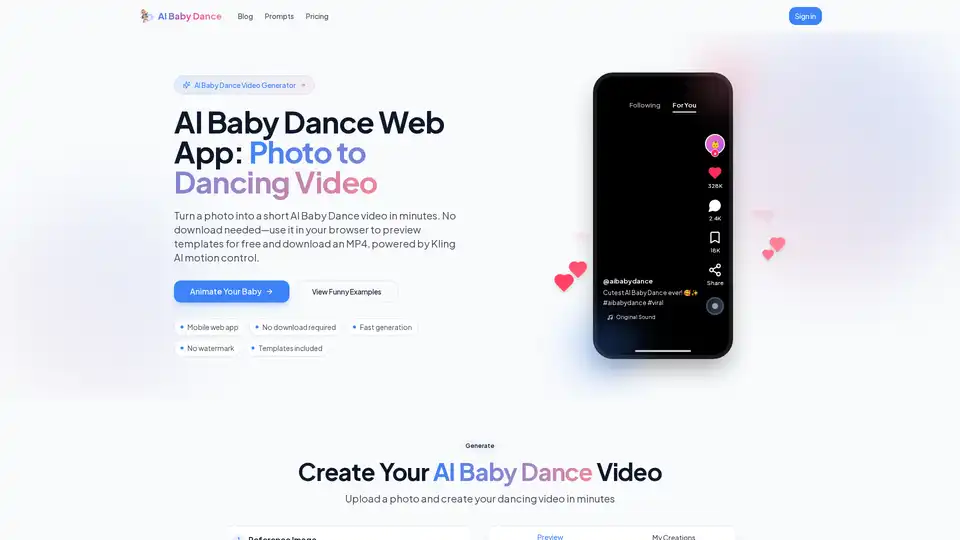
Overview of AI Baby Dance Video Generator
What is AI Baby Dance Video Generator?\n\nAI Baby Dance Video Generator is a specialized web application designed to instantly transform a single portrait photo into a short, animated dancing video. Leveraging advanced AI motion control technology—specifically powered by Kling AI—this tool creates smooth and realistic dancing animations from static images. The core concept addresses the viral trend of "AI Baby Dance" videos seen on social media platforms like TikTok, Reels, and Shorts.\n\nThis tool is not a downloadable application but a browser-based web app, meaning users can access it directly without installation. It democratizes content creation, allowing anyone to recreate viral trends, make family fun clips, or create entertaining content in minutes, regardless of their video editing skills.\n\n## How Does AI Baby Dance Video Generator Work?\n\nThe underlying technology relies on sophisticated AI models for motion synthesis and generation. The process is streamlined into a user-friendly workflow:\n\n1. Photo Analysis: The AI analyzes the uploaded portrait photo to identify facial features, body structure, and key points for animation.\n2. Motion Mapping: It maps a predefined dance motion template (e.g., a baby dance routine, hip-hop moves, or K-pop choreography) onto the static image. The integration of Kling AI motion control ensures the animation fluidity is high, reducing jitter and artifacts commonly found in lower-quality AI generators.\n3. Rendering: The system generates the video frames, synchronizing the motion with the original facial expressions (as much as possible from a still image) and lighting conditions. This typically takes 3-5 minutes depending on the video length (10-15 seconds) and resolution (720p or 1080p).\n4. Output: The final product is an MP4 file, optimized for vertical viewing, ready to be shared on mobile-first social platforms.\n\n## Key Features of AI Baby Dance Video Generator\n\nThis tool offers several features that distinguish it from generic AI video generators:\n\n- Kling AI Powered: Specifically optimized for smoother motion and better realism in dancing animations, addressing common issues like flickering or disjointed movements.\n- No Download Required: It is a pure web app, ensuring accessibility across devices (desktop, tablet, mobile) without consuming storage space.\n- Extensive Template Library: Users can choose from a variety of trending dance styles, including Cute, Funny, K-pop, and Hiphop. This variety allows for content diversity and caters to different audience preferences.\n- Free Preview & Paid Credits: Users can preview templates and generate low-watermark samples. For HD quality, no-watermark exports, and commercial use, the system operates on a credit-based model.\n- Privacy-Centric: The service emphasizes data privacy. Uploaded photos are automatically deleted within 24 hours, and generated videos are stored for only 30 days, encouraging users to download their content promptly.\n- Mobile-Friendly Interface: The UI is designed for touchscreens, making it easy to upload photos and generate videos on the go, perfect for creating content directly from a smartphone.\n\n## Use Cases for AI Baby Dance Video Generator\n\nThe utility of this tool spans from personal entertainment to content marketing:\n\n- Recreating Viral Trends: For social media users and influencers, the generator offers a quick way to hop on the "AI Baby Dance" trend without complex video editing.\n- Family Entertainment: Parents can upload photos of their children (or even pets) to create cute, shareable clips for family group chats or personal memories.\n- Content Creation: For TikTok, Instagram Reels, and YouTube Shorts creators, this tool provides a steady stream of engaging content. The ability to regenerate with different templates keeps the content fresh.\n- Holiday & Event Greeting: Create unique animated greeting cards for birthdays, New Year, or other celebrations featuring the subject dancing.\n- Meme Generation: Using adult photos, users can create humorous meme videos, adding a playful twist to standard portraits.\n- Light Marketing: Small businesses and creators can use the "fun" factor of these videos for playful promotional materials, though commercial use requires a paid plan.\n\n## Who is AI Baby Dance Video Generator For?\n\nThis tool is designed for a broad audience:\n\n- Social Media Enthusiasts: Individuals who want to participate in viral trends quickly and easily.\n- Parents and Families: Those looking to create fun digital keepsakes.\n- Content Creators & Influencers: TikTok and Instagram users who need consistent, engaging visual content without spending hours editing.\n- Marketers: Those looking for novel, eye-catching visuals for social media campaigns (subject to usage rights and paid plans).\n- Anyone with a Portrait: The tool is not strictly limited to babies; any clear front-facing portrait can be animated, broadening its use case.\n\n## How to Use AI Baby Dance Video Generator\n\nUsing the tool is straightforward and requires no technical skills:\n\n1. Upload a Photo: The key to good results is a clear, well-lit, front-facing photo. The AI struggles with blurry images, side profiles, or obscured faces (sunglasses, masks).\n2. Select a Template: Browse the library of dance templates. Preview options are often available to see the style before committing.\n3. Generate: Click the "Generate" button. The system will queue the request. A progress indicator shows the status (Queued, Generating, Rendering).\n4. Review and Download: Once finished, preview the video. If satisfied, download it as an MP4 file. Standard 720p is usually available for free previews, while 1080p HD quality without watermarks may require an upgrade or credits.\n\n## Pricing and Plans\n\nWhile the tool offers free previews and sample runs, fully utilizing the service typically involves a credit system or subscription:\n\n- Free Tier: Allows users to test the feature, often with a watermark or lower resolution (e.g., 720p), and limited generation runs.\n- Paid Plans (Creator/Pro): Unlock HD (1080p) resolution, remove watermarks, grant commercial usage rights, and provide a higher volume of credits for generating more videos. Users should check the latest pricing on the official site for specific credit costs.\n\n## Frequently Asked Questions (FAQ)\n\nQ: Is there a free AI Baby Dance video generator?\nA: Yes, this web app offers a free preview and trial generation. However, for HD downloads, no watermarks, and commercial use, a paid plan is required.\n\nQ: What is the best photo to use?\nA: Use a clear, front-facing photo with good lighting. Avoid blurry images, shadows covering the face, or photos where the face is turned away.\n\nQ: Can I use this for commercial purposes?\nA: Commercial use is available on Creator and Pro plans, provided you have the rights to the photos used.\n\nQ: How long does it take to generate a video?\nA: It typically takes 3-5 minutes depending on the video length and server load.\n\nQ: Does it store my photos?\nA: For privacy, uploaded photos are deleted after 24 hours, and generated videos are deleted after 30 days.\n\nQ: Can I use adult photos?\nA: Yes, while the tool is marketed for "AI Baby Dance," it works with any clear portrait photo. Users must own or have permission to use the images they upload.\n\n## Conclusion\n\nThe AI Baby Dance Video Generator is a powerful yet simple tool that bridges the gap between static photography and dynamic video content. By leveraging Kling AI motion technology, it offers a level of realism and smoothness that sets it apart in the crowded AI video generation space. Whether you are a casual user wanting to create a funny family clip or a content creator looking for your next viral hit, this web app provides an accessible, fast, and privacy-respecting solution.\n\nNote: As with any AI tool, results may vary based on photo quality and template selection. Always ensure you have the rights to any images you upload.
Best Alternative Tools to "AI Baby Dance Video Generator"

Tags Related to AI Baby Dance Video Generator