
Dropflow
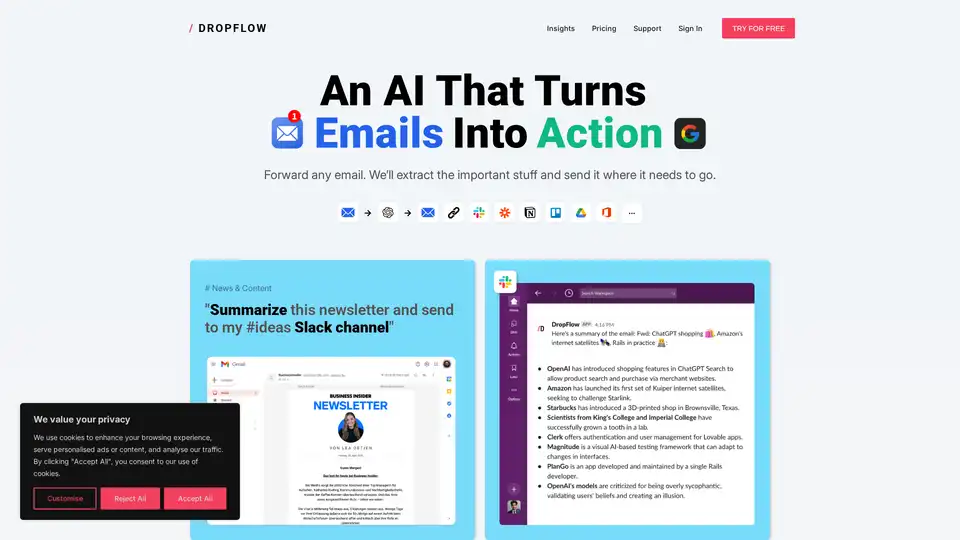
Overview of Dropflow
What is Dropflow?
Dropflow is an innovative AI-powered automation tool designed to streamline workflows by extracting critical data from forwarded emails and seamlessly integrating it into various platforms such as Slack, Google Sheets, Trello, Notion, and custom APIs. It is ideal for professionals and teams looking to automate repetitive tasks and enhance productivity.
Key Features of Dropflow
- Automated Data Extraction: Dropflow intelligently parses emails to extract essential information, such as invoice details, candidate resumes, flight details, and more.
- Multi-Platform Integration: Supports integration with popular tools like Slack, Google Sheets, Trello, and Notion, ensuring data is sent to the right destination.
- Customizable Flows: Users can create and customize flows to suit specific needs, such as summarizing newsletters or extracting financial data.
- Team Collaboration: Facilitates teamwork by allowing multiple email addresses and custom receiver settings.
- Monthly Reporting: Provides insights and reports to track usage and performance.
How Does Dropflow Work?
Dropflow operates by analyzing the content of forwarded emails. Users can set up predefined flows or customize their own to specify what data to extract and where to send it. For example:
- News & Content: Summarize newsletters and send them to a Slack channel.
- Finance & Accounting: Extract invoice data and send it to a Google Sheet.
- HR & Recruitment: Extract candidate details from resumes and add them to Notion.
- Analytics: Summarize daily status updates and email them to the team.
How to Use Dropflow?
- Sign Up: Create an account on the Dropflow platform.
- Set Up Flows: Choose from predefined templates or create custom flows based on your needs.
- Forward Emails: Forward the emails you want to process to Dropflow.
- Automate: Dropflow will extract the data and send it to the specified destination.
Why Choose Dropflow?
- Efficiency: Automates repetitive tasks, saving time and reducing manual errors.
- Flexibility: Supports a wide range of integrations and customizable flows.
- Scalability: Suitable for both individual users and teams, with plans that cater to different needs.
- User-Friendly: Easy to set up and use, with a straightforward interface.
Who is Dropflow For?
Dropflow is designed for:
- Business Professionals: Who need to manage large volumes of emails and extract critical data efficiently.
- Teams: Looking to streamline collaboration and data sharing.
- HR Departments: To automate the extraction of candidate information from resumes.
- Finance Teams: To extract and manage invoice data seamlessly.
Pricing Plans
- Free Plan: Includes 1 flow from a template, up to 5 emails/month, and sending from 1 email address.
- Pro Plan: €4/month, offering up to 20 customizable flows, multiple destinations, and up to 200 emails/month.
- Custom Plans: Starting from €5/month for additional customizations and integrations.
Best Way to Automate Email Data Extraction
Dropflow provides a seamless solution for automating email data extraction, making it an essential tool for modern workflows. By leveraging AI, Dropflow ensures that critical information is accurately extracted and sent to the right place, enhancing productivity and efficiency.
Tags Related to Dropflow
