
Editaimg
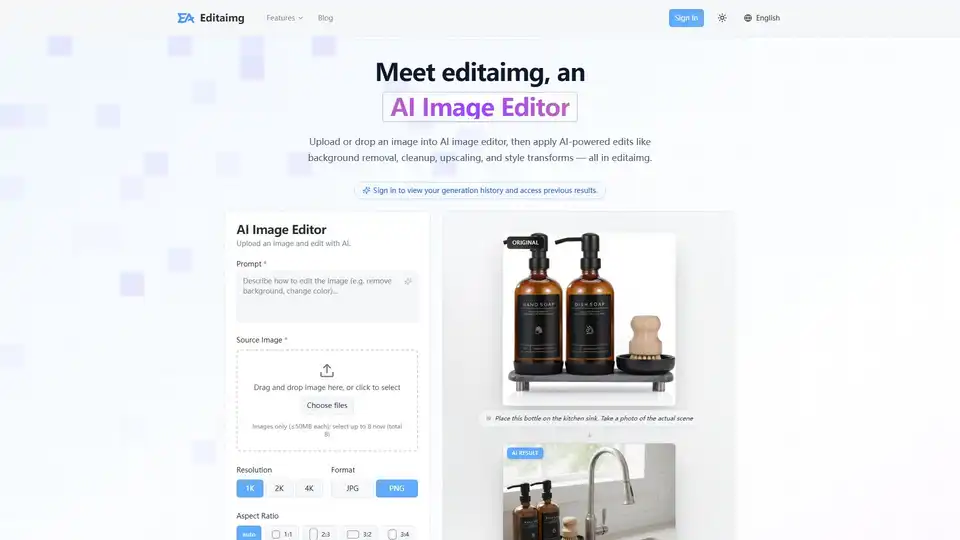
Overview of Editaimg
What is Editaimg: Your AI-Powered Image Editor?
Editaimg is an innovative online AI image editor designed to empower anyone, from professional photographers to casual users, to effortlessly edit, enhance, and transform photos. Leveraging cutting-edge artificial intelligence, Editaimg makes sophisticated image manipulation accessible without requiring extensive graphic design skills. Whether you need to refine a travel photo, prepare product shots for e-commerce, or simply unleash your creative vision, Editaimg streamlines the entire process, delivering professional-grade results in mere seconds.
This powerful AI tool is more than just an editor; it's a creative partner that understands your prompts and executes complex tasks with precision. It's built for efficiency, offering non-destructive editing, instant previews, and seamless one-click exports, ensuring a smooth and intuitive user experience.
Key Features and Capabilities of Editaimg
Editaimg stands out with a comprehensive suite of AI-powered features engineered to meet a wide range of image editing needs.
AI-Powered Editing at Your Fingertips
- Background Removal: Instantly remove distracting backgrounds from any image, creating clean, professional cutouts. Ideal for product photography, profile pictures, or isolating subjects.
- Image Cleanup & Inpainting: Effortlessly erase unwanted objects, blemishes, or imperfections from your photos. Whether it's removing people from a scenic landscape, clearing utility poles, or tidying up a cluttered scene, Editaimg intelligently reconstructs the background for a flawless finish.
- Image Upscaling: Boost the resolution and clarity of your images to stunning levels. Editaimg supports upscaling to 1K, 2K, and even 4K, ensuring your photos look crisp and detailed, perfect for prints or high-resolution displays.
- Style Transforms: Apply artistic styles, sophisticated color grading, and nuanced lighting adjustments to completely alter the mood and aesthetic of any picture. From vibrant pop art to subtle vintage tones, transform your images with creative flair.
Advanced Creative Transformations
Editaimg goes beyond basic edits, offering powerful tools for complex creative manipulations:
- Object Replacement: Subtly or dramatically alter elements within your images. Imagine swapping a coffee cup for a teacup in a product shot, or changing any object to perfectly match your creative vision. Editaimg executes these precise changes seamlessly.
- Example: Turn a plain coffee cup into an elegant teacup in an advertisement with a simple prompt.
- Create Realistic Product Shots: Revolutionize your e-commerce visuals. Take a simple product image, like a soap dispenser on a white background, and place it into a realistic setting, such as a stylish kitchen sink. Editaimg crafts professional, stunning product photos that captivate potential buyers.
- Example: Transform a studio shot of a cosmetic bottle into an authentic lifestyle image set in a bathroom.
- Add Elements to Photos:
- AI Snow: Instantly infuse any image with realistic snowfall and a seasonal atmosphere. Adjust the intensity and lighting to perfectly match the scene, adding a magical touch.
- Add Someone to Photo: Naturally blend new individuals into existing photos in seconds, making group shots complete or adding a desired person to a scene.
- Image Text Editor: Gain full control over text within your images. Easily add, edit, or remove text while intelligently matching existing fonts, colors, and textures, ensuring a cohesive look.
- AI Image Translator: Break down language barriers in visual content. Translate text embedded in images into over 130 languages, all while meticulously preserving the original style and formatting of the image.
- Gemini Watermark Remover: Conveniently remove visible Gemini watermarks directly in your browser, ensuring clean, privacy-first exports without needing uploads or logins.
How Does Editaimg Work? A Seamless Workflow for Stunning Results
Using Editaimg is designed to be intuitive and efficient, ensuring you can bring your creative ideas to life with minimal effort. Here’s a simple four-step process:
- Import Your Image: Begin by dragging and dropping your file directly into the AI Image Editor. Editaimg supports various image formats, making it easy to start your creative process instantly.
- Describe Your Idea: Utilize the prompt box to clearly communicate your vision to Editaimg. Whether you want to "remove people from the background," "place this bottle on the kitchen sink," or "replace the text with 'welcome to editaimg'," the AI understands your natural language instructions.
- Choose Settings: Fine-tune your desired output with Editaimg's advanced settings. Adjust parameters like resolution (1K, 2K, 4K), select your preferred file format (JPG, PNG), choose aspect ratios (e.g., 1:1, 16:9), and even specify style strength for precise control over the transformation.
- Generate Your Edit: Click the 'Edit' or 'Generate' button and watch as Editaimg transforms your photo in seconds. Review the high-quality AI-generated results in a clean grid and download or share them with a single click.
Who Can Benefit from Editaimg? Target Users & Practical Value
Editaimg is an invaluable tool for a diverse range of users seeking high-quality image editing without the steep learning curve of traditional software.
- Photographers (Amateur & Professional): Quickly clean up shots, remove distractions, enhance details, and experiment with creative styles to elevate their portfolios.
- E-commerce Businesses & Online Retailers: Create stunning, professional product images for websites and marketing materials, including realistic product placements, without expensive photoshoots.
- Social Media Managers & Content Creators: Generate engaging visuals rapidly, ensuring consistent branding and high-quality content for platforms like Instagram, Facebook, and blogs.
- Designers & Marketers: Streamline workflow by quickly iterating on design concepts, preparing assets, and localizing visual content with text translation.
- Everyday Users: Anyone who wants to perfect personal photos, remove exes from vacation pictures, or simply make their memories look their best.
Why choose Editaimg? The practical value lies in its ability to save time, reduce costs associated with professional editors or complex software, and democratize access to advanced image manipulation, making professional-level results accessible to everyone.
Editaimg Pricing: Flexible Credit Packages for Every Need
Editaimg offers straightforward, one-time payment credit packages, giving users full access to its AI Image Editor features without recurring subscriptions. This flexible model allows you to purchase credits as needed, ensuring you only pay for what you use.
| Package | Credits | Price (USD) | Key Benefits |
|---|---|---|---|
| Basic | 160 | $9.9 | Ideal for light usage, no expiration |
| Standard | 800 | $29.9 | Popular choice for regular creators, no expiration, priority generation queue |
| Pro | 4000 | $49.9 | Premium volume for professionals, no expiration, priority generation queue |
All packages come with credits that never expire and offer priority generation queue access, ensuring your tasks are processed efficiently.
Frequently Asked Questions (FAQs) about Editaimg
To help you get started and make the most of your Editaimg experience, here are answers to some common questions:
What is Editaimg and how does it work?
Editaimg is an advanced AI Image Editor that empowers users to transform photos with artificial intelligence. You simply upload an image, provide a text prompt describing your desired edit, and Editaimg's AI instantly applies professional-grade enhancements like background removal, object replacement, or style changes.
Do I need photo editing skills to use it?
No, absolutely not. Editaimg is designed for ease of use. Its AI handles the complex tasks, allowing you to achieve professional results with simple prompts and a few clicks, even if you have no prior photo editing experience.
What kind of edits can I make?
You can make a wide range of edits, including background removal, object removal/replacement, image cleanup, upscaling resolution, applying artistic style transfers, adding elements like snow, editing/translating text within images, and creating realistic product shots.
How long does it take to see results?
Editaimg leverages powerful AI to deliver results in seconds. You'll see your transformed image almost instantly after clicking the 'Generate Edit' button.
Why using AI Image Editor?
Using an AI Image Editor like Editaimg offers unparalleled speed, efficiency, and access to professional-quality results. It saves time on manual editing, opens up new creative possibilities, and reduces the need for expensive software or specialized skills.
Can I customize the edits?
Yes, you can customize edits through detailed prompts and various settings such as resolution, format, aspect ratio, and style strength, giving you precise control over the final output.
Can I use Editaimg to remove backgrounds or create a white background?
Yes, Editaimg is highly effective for background removal. You can easily remove backgrounds entirely or replace them with a plain white background or any other scene you describe.
Does Editaimg work as an object remover or watermark remover?
Yes, Editaimg functions as an excellent object remover, intelligently identifying and erasing unwanted elements from your photos. It also includes a specific feature for removing Gemini AI watermarks.
Can I upscale image resolution with this AI picture editor?
Absolutely. Editaimg provides powerful upscaling capabilities, allowing you to enhance your image resolution to 1K, 2K, and 4K, improving clarity and detail.
Unlock Your Creative Potential with Editaimg AI Image Editor
Editaimg’s AI Image Editor is your go-to solution for transforming images with unprecedented ease and speed. From intricate object removal and seamless background changes to intelligent image cleanup and the ability to download high-resolution results, Editaimg empowers you to create stunning visuals without requiring professional skills. Start editing for free and discover the future of image enhancement today.
Tags Related to Editaimg
