
ImageUnblur
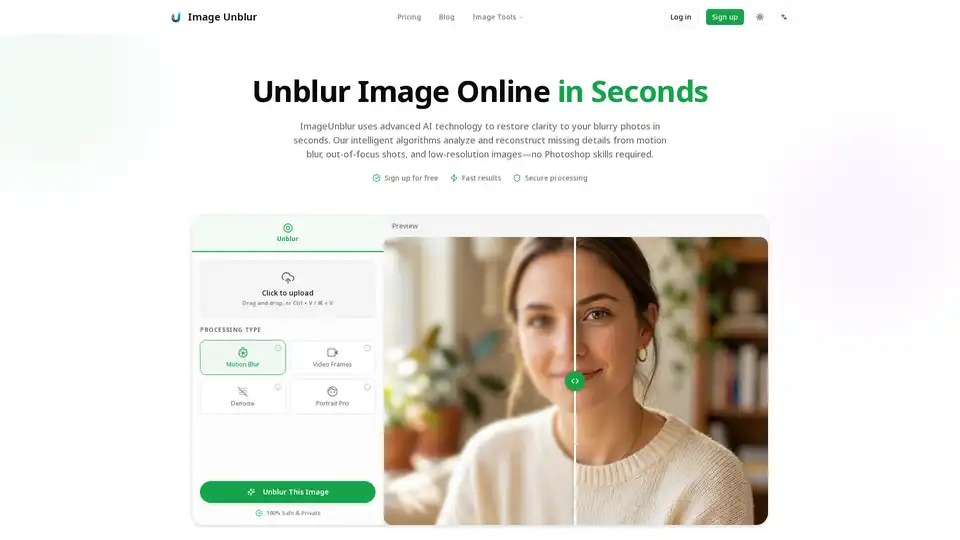
Overview of ImageUnblur
What is ImageUnblur?
ImageUnblur is a free online AI-powered tool designed to restore clarity to blurry photos automatically. Unlike traditional sharpening tools that simply increase contrast and edge hardness, ImageUnblur uses advanced deep learning algorithms trained on millions of image pairs. The AI analyzes degradation patterns in your photo—such as motion blur, out-of-focus areas, or compression artifacts—and intelligently reconstructs missing visual information. This results in natural-looking, clear images rather than over-processed, artificial-looking results.
Key Features of ImageUnblur
ImageUnblur offers a comprehensive suite of features to address various types of image blurriness:
Multiple Unblur Modes: Choose from specialized AI models optimized for different blur types:
- Motion Blur: Corrects streaks and softness caused by camera shake or moving subjects.
- Video Frames: Enhances clarity in individual frames extracted from blurry videos.
- Denoise: Reduces grain and noise, especially effective for low-light or high-ISO images.
- Portrait Pro: Sharpens facial features like eyes, hair, and contours while maintaining a natural look, ideal for selfies and profile pictures.
Comprehensive Blur Fixes: Targets a wide range of real-world scenarios:
- Motion Blur & Camera Shake: From handheld shots and slight subject movement.
- Out-of-Focus Blur: For missed autofocus or shallow depth of field issues.
- Compression Artifacts: Cleans up blockiness and banding from social media platforms (WhatsApp, Instagram) or JPEG compression.
- Low Resolution: Enhances old scans, small thumbnails, and screenshots lacking detail.
- Low-Light Blur: Improves clarity while reducing noise in night photos.
Additional Enhancement Tools:
- Upscale Resolution: Increase image size up to 4x after unblurring for printing or professional use.
- Batch Processing: Process multiple images simultaneously with a free account, saving time for bulk editing needs.
- Secure & Private Processing: Images are processed on secure servers and automatically deleted after 2 hours. No data is shared, sold, or used for AI training.
How ImageUnblur Works: A Simple 3-Step Process
ImageUnblur is designed for users of all skill levels, requiring no technical expertise:
- Select Your Image: Drag and drop or click to upload your blurry photo. Supported formats include JPG, PNG, and WebP up to 10MB. A free account is required to start.
- AI Enhancement: The tool analyzes the image and automatically applies the most effective unblur mode based on the detected blur type. Users can also manually select a specific mode (e.g., Motion Blur, Portrait Pro) for targeted results.
- Download Result: Preview the before/after comparison instantly. Download the enhanced image for free, or upgrade to the Pro plan for higher-resolution outputs and access to premium AI models.
Use Cases and Practical Value
ImageUnblur is valuable across various photography and visual content scenarios:
- Portraits & Selfies: Rescue soft-focus portraits caused by missed autofocus or slight motion, enhancing facial details for social media profiles and family photos.
- Product Photography: Improve clarity in product images by reducing motion blur, making textures, labels, and materials more visible for e-commerce listings and catalogs.
- Restoring Old Memories: Enhance scanned vintage photos, reducing noise and grain to bring family albums and old prints back to life with clearer faces and edges.
- Text & Screenshots: Make blurry text in receipts, slides, documents, or shipping labels readable again. This is particularly useful for preparing images for OCR (Optical Character Recognition) tools.
- Social Media & Compressed Images: Clean up compression artifacts from shared files to achieve cleaner edges for reposting or printing.
- Low-Light Photography: Improve handheld night shots by sharpening soft details while reducing high-ISO noise.
Who is ImageUnblur For?
ImageUnblur is ideal for:
- Amateur Photographers: Individuals looking to quickly fix imperfect shots without mastering complex editing software.
- E-commerce Sellers & Marketers: Anyone needing to produce professional-looking product photos and visual content without expensive equipment or studios.
- Social Media Users: Users wanting to enhance personal photos, selfies, or images shared on platforms like Instagram and WhatsApp.
- Genealogy & History Enthusiasts: People digitizing and restoring old family photos and historical documents.
- Professionals & Students: Anyone needing to clarify documents, notes, or screenshots for work or study purposes.
Why Choose ImageUnblur?
- Speed and Efficiency: Most images are unblurred in under 30 seconds, thanks to an optimized AI pipeline.
- User-Friendly: No Photoshop skills or manual editing required; the intuitive interface guides users from upload to download.
- Privacy-Focused: The service prioritizes user privacy with secure processing and automatic data deletion policies.
- Accessible Pricing: A generous free tier allows users to start immediately without a credit card. Pro upgrades are available for advanced needs like 4K resolution.
Getting Started
To unblur your images with ImageUnblur, simply visit the website, upload your photo, and let the AI handle the rest. It's an efficient, privacy-conscious solution for transforming blurry images into sharp, clear visuals.
Tags Related to ImageUnblur
