
imgAk
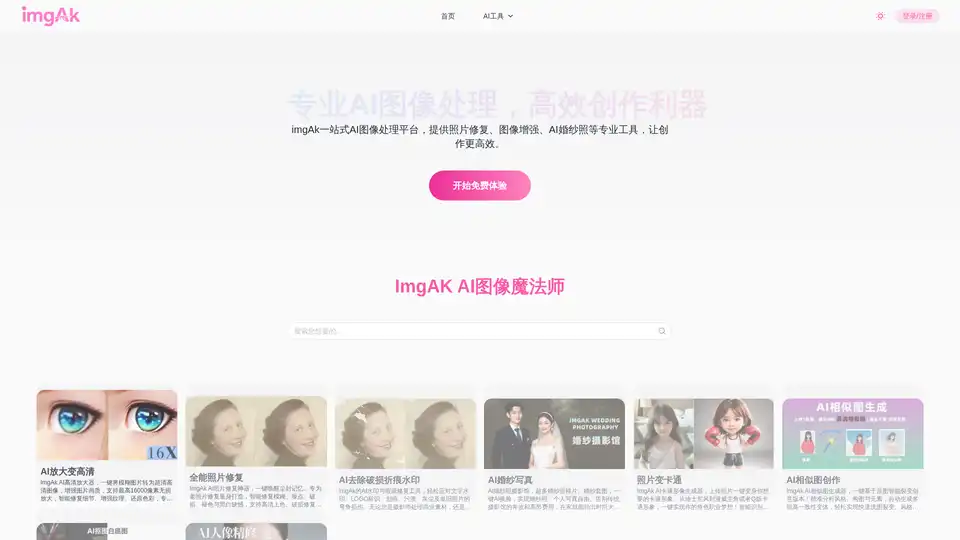
Overview of imgAk
What is imgAk?
imgAk is a comprehensive, online AI image processing platform designed to simplify complex photo editing tasks through advanced artificial intelligence. It serves as a one-stop solution for individuals and professionals seeking to enhance, restore, and transform their digital images without requiring extensive technical skills or expensive software like Photoshop. The platform leverages deep learning algorithms to perform tasks that traditionally required manual effort, making high-quality image editing accessible to everyone.
Key Features of imgAk
imgAk offers a robust suite of tools tailored to diverse image editing needs. Here are the core functionalities:
1. AI Photo Restoration & Enhancement
This feature is ideal for reviving old or damaged memories. imgAk excels in:
- Old Photo Restoration: It intelligently repairs scratches, noise, fading, and tears on vintage photos. It supports colorization of black-and-white images, restoring life to monochrome memories.
- AI Upscaling: Users can enlarge images up to 16,000 pixels without losing quality. It sharpens details, enhances textures, and restores resolution, making low-quality images suitable for printing or large displays.
- Damage & Crease Removal: Specifically designed to remove physical damage like fold lines, water stains, and dust, making old photos look brand new.
2. Watermark & Blemish Removal
The AI Watermark & Blemish Removal tool allows users to clean up images effortlessly. It can identify and remove text watermarks, logos, scratches, and污渍 (stains). It automatically fills in the background to ensure the removal looks natural and seamless, saving users from the tedious process of manual cloning.
3. AI Avatar & Cartoon Generator
For social media or creative projects, imgAk provides:
- Photo to Cartoon: Transform real-life photos into various cartoon styles, including Disney, Marvel, or Q-version characters. It identifies facial features and applies artistic filters.
- AI Avatar Generator: Creates unique avatars based on uploaded photos and text prompts, perfect for profile pictures or gaming identities.
4. Smart Background Removal & Object Cutout
The Smart Cutout feature uses semantic segmentation to separate subjects from backgrounds with precision, even handling complex edges like hair or fur (hair-level detail). It supports batch processing and allows users to replace backgrounds instantly, which is crucial for e-commerce product listings or graphic design.
5. AI Wedding Photography & Portrait Retouching
- AI Wedding Photos: Users can generate professional wedding photos by simply uploading faces onto high-quality templates. It eliminates the need for expensive studio sessions, offering various styles and poses.
- Portrait Retouching: Automates skin smoothing, blemish removal, face slimming, and whitening while maintaining a natural look, ideal for headshots and professional profiles.
6. AI Similar Image Generation
This tool helps users create variations of an existing image. It analyzes the style, composition, and elements of the original image and generates high-consistency variants. It is particularly useful for e-commerce sellers who need to refresh product images or designers looking for inspiration and batch asset creation.
How does imgAk Work?
imgAk operates on a web-based model, meaning there is no need for downloads or installations. Users simply visit the website, upload their images, and select the desired tool. The underlying AI models process the image in the cloud and return the edited version. The workflow generally follows these steps:
- Upload: Drag and drop or select an image file.
- Select Tool: Choose the specific function (e.g., "Upscale," "Remove Background," "Restore").
- Process: The AI analyzes the image and applies the transformation.
- Download: Users can preview the result and download the high-resolution output.
Who is imgAk For?
imgAk is designed for a wide range of users:
- Photographers: For quick retouching, restoring old client photos, and upscaling images for print.
- E-commerce Sellers: Essential for creating clean, white-background product shots and generating multiple product variations quickly.
- Graphic Designers: A time-saving utility for bulk background removal and creative concept generation.
- Social Media Users: Anyone looking to create unique avatars or enhance personal photos for better engagement.
- General Consumers: Individuals wanting to fix old family heirlooms or create fun, cartoonized versions of themselves.
Why Choose imgAk?
Choosing imgAk means opting for efficiency and professional quality without the steep learning curve. It democratizes advanced image editing, allowing users to achieve "professional-grade" results with one-click operations. It is cost-effective, saving money on expensive software licenses and professional editing services. Furthermore, its diverse toolset covers almost every common image manipulation need, making it a versatile addition to anyone's digital toolkit.
How to Use imgAk?
- Visit the Website: Navigate to the imgAk platform.
- Choose Your Tool: Browse the menu (AI Upscale, Photo Repair, Cutout, etc.) and click on the relevant section.
- Upload Your Image: Click the upload button to add your file.
- Adjust Settings (Optional): Some tools offer sliders or options to fine-tune the effect (e.g., repair intensity).
- Process and Download: Wait for the AI to finish and download your enhanced image.
Tags Related to imgAk
