
MusicMakerApp
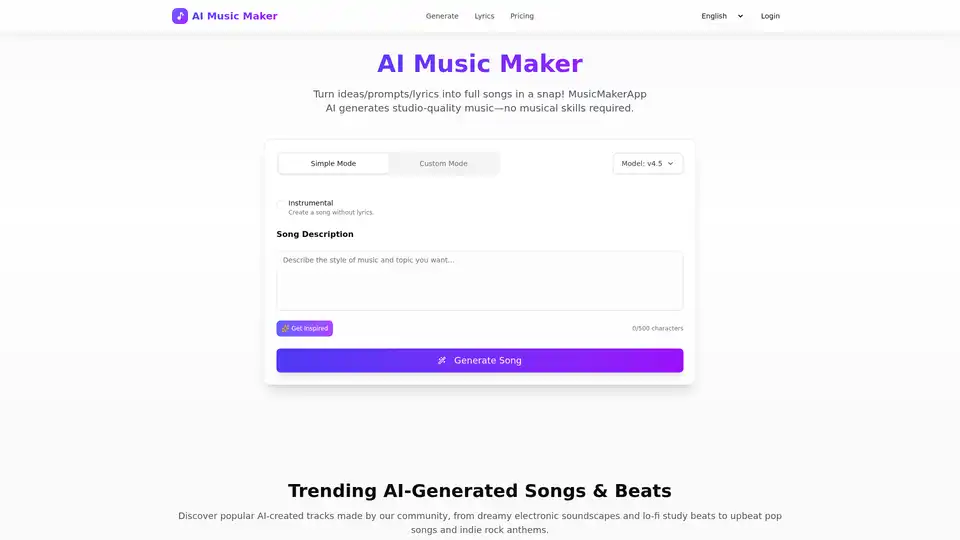
Overview of MusicMakerApp
MusicMakerApp: AI-Powered Music Creation
What is MusicMakerApp?
MusicMakerApp is an advanced AI Music Generator that turns your text prompts or lyrics into complete, original songs, including melodies and vocals. You can create professional music online in seconds without needing any music theory knowledge.
Key Features of MusicMakerApp
- Simple Mode: Quickly generate songs with minimal input.
- Custom Mode: Personalize your music with detailed settings.
- Lyrics Generation: Describe a story, mood, or concept, and the AI writes complete verses, hooks, and choruses.
- Genre and Mood Customization: Choose genres, moods, instruments, and vocal styles to personalize your sound.
- Copyright-Safe Music: Generate unique background music, hooks, and theme tracks tailored to your video content.
How Does MusicMakerApp Work?
- Enter your idea or lyrics: Type a short prompt or paste your lyrics to describe the mood, genre, or style you want.
- Generate your AI song: Click "Generate Song" and the AI turns your words into a complete track with melody, arrangement, and vocals.
- Listen and download: Preview your song online, then download the MP3 (and other formats on paid plans) for use in your projects.
How to Use MusicMakerApp?
- Create Professional AI Music: No skills needed. MusicMakerApp turns your ideas into full tracks with melody, arrangement, and vocals—using only a few words of input.
- Convert Any Text Into a Complete Song: Paste a paragraph, script, or concept, and let the AI compose the melody, harmony, beat, and song structure.
- Turn Lyrics Into Release-Ready Songs: Upload or type your lyrics, and MusicMakerApp generates an original song tailored to your words.
- Generate Lyrics From Any Idea or Theme: Describe a story, mood, or concept, and the AI writes complete verses, hooks, and choruses.
Why Choose MusicMakerApp?
- No Musical Skills Required: Create studio-quality songs without instruments, software, or experience.
- Copyright-Safe: Generate unique background music, hooks, and theme tracks tailored to your video content.
- Customizable: Choose genres, moods, instruments, and vocal styles to personalize your sound.
- Easy to Use: Simple and intuitive interface for quick music creation.
Who is MusicMakerApp For?
- Indie Artists: Generate high-quality backing tracks in minutes.
- Content Creators: Create background music for YouTube, TikTok, and Reels.
- Podcast Hosts: Create professional-sounding segments for podcasts.
- Music Teachers: Generate practice tracks for students.
- Game Developers: Create game soundtracks instantly.
- Filmmakers: Create custom soundtracks that match the emotional tone of each scene.
Best Practices for Writing Prompts
The best results come from detailed prompts. Please describe the desired Genre, Mood, and specific Vocal Type (e.g., Male/Female Vocals) or Instrumentation.
Pricing and Subscription
- Free Tier: Offers daily credits to generate songs for personal, non-commercial use.
- Paid Subscription: Unlocks commercial rights and higher quality formats like WAV.
Frequently Asked Questions
What is MusicMakerApp?
MusicMakerApp is an advanced AI Music Generator that turns your text prompts or lyrics into complete, original songs, including melodies and vocals. You can create professional music online in seconds without needing any music theory knowledge.
Is MusicMakerApp free to use?
Yes, we offer a Free Tier with daily credits to generate songs. Free songs are restricted to personal, non-commercial use only. You can upgrade to a paid subscription for commercial rights.
Can I use the generated songs for commercial purposes?
Yes, but only with an active paid subscription. You retain full commercial usage rights and ownership for all songs generated during your paid subscription period. Free tier songs cannot be used for profit.
Do I own the copyright to the songs I create?
Yes, active paid subscribers own the full copyright and intellectual property of the tracks they generate. You are free to distribute these songs to platforms like Spotify and YouTube for monetization.
What file formats are available for download?
All users can download songs in MP3 format. Paid subscribers can unlock and download higher quality formats like WAV.
Is there a maximum song length, and can I edit the resulting audio?
Maximum song length varies but typically ranges up to 8 minutes. While you cannot directly edit the audio within the app, you can use new prompts or change the original lyrics/settings to re-generate a different version.
Can I cancel my subscription at any time?
Yes. You can easily cancel your subscription renewal at any time through your account settings. Your access to paid features will remain active and uninterrupted until the end of your current billing cycle.
Is MusicMakerApp a website or a mobile application?
MusicMakerApp is currently a web application that is fully accessible and responsive on both desktop and mobile browsers. A dedicated native mobile app is currently under development.
Do I have to credit MusicMakerApp when I share my songs?
No, legal attribution is not required for paid users (as you own the copyright). However, we always appreciate a simple credit (e.g., "Music created with MusicMakerApp") when you share on social media.
Conclusion
MusicMakerApp is a revolutionary tool for anyone looking to create professional-quality music quickly and easily. Whether you're an indie artist, content creator, podcast host, music teacher, game developer, or filmmaker, MusicMakerApp provides the tools you need to bring your musical ideas to life.
Tags Related to MusicMakerApp
