
ngram
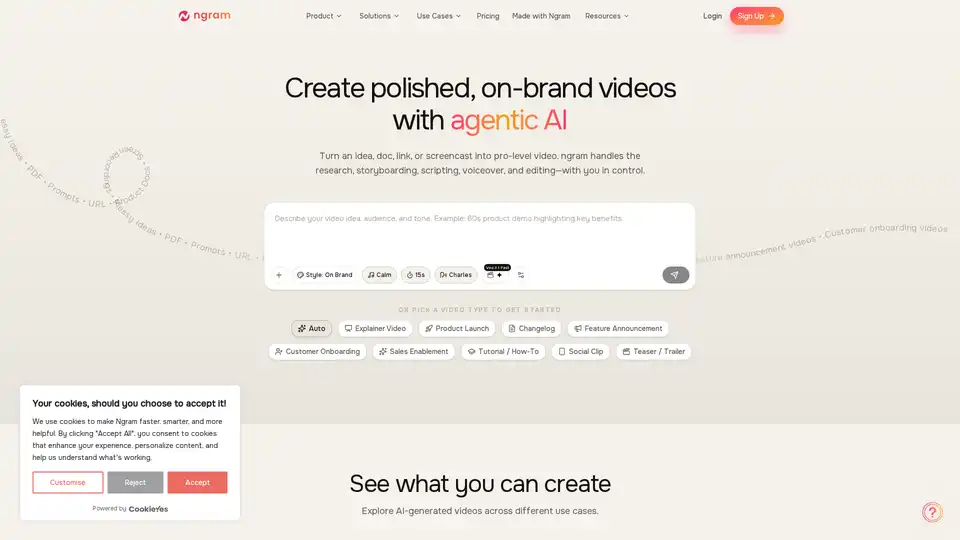
Overview of ngram
What is ngram? Unleash the Power of Agentic AI for Professional Video Creation
In today's fast-paced digital world, compelling video content is no longer a luxury but a necessity for businesses and creators alike. Yet, the traditional video production pipeline—involving extensive research, complex storyboarding, scriptwriting, voiceover, and meticulous editing—can be all-consuming, resource-intensive, and often prohibitive for many. This is where ngram steps in as a revolutionary AI-powered platform, designed to transform your raw ideas and existing assets into polished, on-brand professional videos with unprecedented speed and efficiency.
At its core, ngram leverages advanced agentic AI to automate the entire video creation workflow. From initial concept to final export, ngram intelligently handles the most intricate tasks, including research, storyboarding, scripting, voiceover generation, and sophisticated editing. The beauty of ngram lies in its ability to empower users with complete control throughout this automated process, ensuring that the final output perfectly aligns with their vision and brand guidelines. Whether you're starting with a vague idea, a comprehensive document, a simple link, or a screen recording, ngram is engineered to streamline your journey to high-quality video content.
What are the Key Features of ngram for Seamless Video Production?
ngram is packed with a suite of powerful features designed to simplify and accelerate professional video creation. These functionalities work in synergy to deliver a comprehensive solution for diverse video needs:
1. Script + Storyboard First
Before any rendering begins, ngram generates a detailed narrative and a scene-by-scene storyboard. This crucial step allows users to visualize the video's flow and make directional adjustments early, saving significant time and resources in post-production. It's about planning with precision to achieve the desired outcome efficiently.
2. Any Asset In
One of ngram's standout capabilities is its versatility in accepting various input formats. Users can start with what they already possess: documents, URLs, screenshots, PDFs, and screen recordings. This flexibility ensures that virtually any form of content can be the starting point for a professional video, eliminating the need to create new assets from scratch.
3. Context-Aware Generation
To ensure the generated video is perfectly tailored, ngram allows users to define key parameters. You can tell the AI who the video is for (audience), what it should achieve (goal), and its intended distribution channel (destination). This context-aware approach ensures the video's structure, length, pacing, and tone are optimally adapted for maximum impact.
4. Screen Recording Magic Edit
For those who frequently create tutorials, product demos, or walkthroughs, ngram's "Screen Recording Magic Edit" is a game-changer. It transforms rough screen captures into polished presentations with smart cuts, intelligent zooms on clicks, cursor emphasis, and automated step labels. This feature eliminates the tedious manual editing typically associated with screen recordings, making professional walkthroughs accessible to everyone.
5. On-Brand by Default
Maintaining brand consistency across all marketing and communication materials is paramount. ngram addresses this by allowing teams to set their brand kit once, including logos, colors, and fonts. Every subsequent video generated adheres to these guidelines, ensuring a consistent and professional brand image across all content, regardless of who on the team creates it.
6. AI Visuals When You Need Them
Facing a lack of suitable footage? ngram can generate scene-matched visuals and motion graphics to fill any gaps. Users can choose from the latest AI video models to create on-brand product shots, abstract backgrounds, or intricate motion graphics, providing a seamless visual experience even when original assets are scarce.
7. Built-In Motion Graphics
Enhance the professionalism and engagement of your videos with ngram's integrated motion graphics. The platform offers clean transitions, emphasis effects, lower thirds, and always-on captions, all designed to elevate the visual appeal and clarity of your message without requiring external tools or specialized skills.
8. Multi-Format Export
Reach your audience wherever they are with multi-format export capabilities. ngram allows you to export your single project in various aspect ratios, including 16:9 (widescreen), 9:16 (vertical for social media), and 1:1 (square). This flexibility ensures your content is optimized for different platforms, from YouTube to Instagram Reels.
9. Iterate in Plain Language
Refining your video has never been easier. ngram understands natural language commands, allowing you to make adjustments simply by typing instructions like "Shorten scene 2" or "make this more technical." This intuitive iteration process enables quick and efficient revisions without the need to restart the entire creative flow.
How Does ngram Work? The Three Steps to Done
ngram simplifies the complex video creation process into three straightforward steps:
Step 1: Input – Bring What You Have
Start by providing ngram with your existing content. This could be anything from documents, URLs, screen recordings, voice notes, images, or raw text. ngram is designed to accept diverse inputs, making it incredibly flexible for various content strategies.
Step 2: Define – Tell Us What It Needs to Do
Guide the AI by defining the core objectives and parameters of your video. Specify your target audience, the main goal of the video, its desired style, and the preferred length. This information empowers ngram to generate highly relevant and effective video content.
Step 3: Ship – Get a Video Ready to Publish
Once you've provided the input and defined the requirements, ngram takes over to produce a complete video. The output includes a detailed storyboard, professional voiceover, appropriate background music, accurate captions, and ensured on-brand consistency. The result is a high-quality video, ready for publishing in minutes, not days.
Who Is ngram For? Ideal Users and Diverse Use Cases
ngram is a versatile AI video creation tool built for a wide array of professionals and teams who need to produce high-quality video content regularly, but without the traditional production overhead. Its adaptable nature makes it invaluable across various roles and industries.
For Marketers & Growth Teams
- Product Marketing: Create compelling product launch videos, feature announcements, explainers, and competitive content that truly resonate with your audience. Ship the videos your launches deserve.
- Growth & Marketing: Quickly generate social clips, landing page videos, and ad creatives. Test multiple variants to identify what performs best and iterate fast for optimal campaign results.
- AI Marketing Copywriting Generation: Automatically transform marketing briefs into video scripts and visual narratives, significantly reducing the time spent on content conceptualization.
- Social Media Content Optimization: Produce engaging short-form videos tailored for platforms like TikTok, Instagram Reels, and YouTube Shorts, optimizing content for maximum reach and engagement.
For Product Teams & Developers
- Product Managers: Communicate roadmap updates, changelogs, and demo narratives effectively. Keep stakeholders informed and explain new features in a format people actually watch.
- Developer Relations: Simplify complex API documentation into easy-to-understand video tutorials and overviews, fostering adoption and community engagement.
For Sales & Customer Success
- Sales Enablement: Craft personalized outbound clips, persona-specific demos, and objection-handling videos. Equip your sales team with dynamic content they will actually use to close deals faster.
- Customer Success: Develop onboarding videos, how-to guides, QBRs, and support videos. Help customers succeed by providing clear, visual instructions, reducing support queries and enhancing user experience.
For Content Creators & Founders
- Content Creators: Scale your content production with AI assistance, turning blogs into videos, podcasts into highlights, and webinars into clips. Maximize your reach across platforms.
- Founders & Solopreneurs: Create powerful pitches, product updates, and marketing videos. Punch above your weight and convey your message professionally without needing a dedicated video team or extensive budget.
Other Key Use Cases Include:
- Tutorials and How-To Guides: Transform documentation into step-by-step video walkthroughs.
- Explainer Videos: Structure messages from problem to solution to proof, with visuals that match.
- Product Demos: Turn rough screen recordings into polished walkthroughs with smart cuts and emphasis.
- Customer Onboarding: Visually guide new users through your product, accelerating their time to value.
- Feature Announcements: Turn changelog text into clear, engaging narratives for social media or websites.
- Social Clips: Create engaging, short-form video content for social media channels.
- Internal Communications: Generate team announcements, CEO updates, and training videos efficiently.
- Event Recaps & Highlights: Quickly produce engaging summaries of events, webinars, or conferences.
- Testimonials & Case Studies: Transform customer feedback into compelling video stories.
- Investor Pitches: Craft professional and impactful pitch deck videos.
Why Choose ngram? Unlocking Unprecedented Efficiency and Control
Choosing ngram means opting for a smarter, faster, and more controlled approach to video creation. The platform is engineered to deliver significant efficiency gains across the board:
- 85% Efficiency: Videos that Know What They're For. Tell ngram the audience, goal, and destination, and it intelligently adapts the structure, length, pacing, and tone. This ensures your video fits the moment, moving far beyond generic templates.
- 70% Efficiency: Any Content Becomes Video. Drop in text, images, PDFs, URLs, or screen recordings. ngram adeptly organizes and transforms diverse content into a coherent, professional video narrative.
- 90% Efficiency: Plan Before You Render. Review the script and storyboard before any generation. This allows you to catch and fix directional issues early, where iteration is fastest and most cost-effective.
- 75% Efficiency: Raw Recordings → Polished Walkthroughs. Automatically cut dead air and mistakes, apply smart zooms, cursor emphasis, callouts, and step labels. Turn even the roughest captures into videos you're proud to share.
- 65% Efficiency: Fill Gaps with Generated Footage. When your assets need support, choose from cutting-edge AI video models to generate on-brand visuals like product shots, motion graphics, or abstract backgrounds that perfectly match your scenes.
- 95% Efficiency: On-Brand, Every Time. Define your brand identity—logo, colors, fonts, intro/outro—just once. Every video produced by your team will automatically adhere to these guidelines, guaranteeing unwavering brand consistency.
These efficiencies translate directly into significant savings in time, effort, and production costs, allowing teams to scale their video content output without compromising on quality or brand integrity.
Addressing Common Questions About ngram
Users often have questions before diving into a new AI tool. Here are some common inquiries about ngram:
Will my videos look generic or AI-generated?
ngram's emphasis on "on-brand by default" and "context-aware generation" ensures your videos are tailored and unique. By incorporating your brand kit and specific creative directions, ngram produces professional videos that reflect your brand's identity, moving beyond generic templates. The ability to iterate in plain language also allows for fine-tuning to avoid a robotic feel.
What if I don't have any assets to start with?
ngram is designed for flexibility. While it excels at transforming existing assets, it can also start from scratch. You can input raw ideas, prompts, or even just a URL, and ngram's AI visuals feature can generate scene-matched visuals and motion graphics to complement your script, ensuring you always have compelling visuals.
How much control do I have over the output?
Unlike fully automated systems, ngram provides you with significant control. You're in charge of defining the audience, goal, style, and length. The "Script + Storyboard First" feature allows for early review and directional steering. Furthermore, the "Iterate in Plain Language" functionality gives you granular control to refine and perfect the video until it meets your exact specifications.
Can I use my own brand colors, fonts, and logo?
Absolutely. ngram includes a comprehensive "Brand Kit" feature where you can define your brand's visual identity. Once set, this kit automatically applies your logo, specific colors, and fonts to every video, ensuring seamless brand consistency across all your productions.
What video formats can I export?
ngram supports multi-format export, allowing you to optimize your videos for various platforms. You can export your projects in common aspect ratios such as 16:9 (standard widescreen for YouTube), 9:16 (vertical for social media stories and reels), and 1:1 (square for platforms like Instagram feeds).
Is this just for marketing videos?
While ngram is incredibly powerful for marketing, its capabilities extend far beyond. It's a versatile tool suitable for product teams, customer success, content creators, sales enablement, founders, and more. Use cases range from internal communications and HR training to educational content and investor pitches.
How is this different from tools like Loom or Descript?
ngram differentiates itself by offering a truly agentic AI approach to the entire video creation process, from research and storyboarding to final editing, with a strong emphasis on brand consistency and context-aware generation. While tools like Loom focus on screen recording and Descript on audio-first editing and transcription, ngram provides a more holistic, AI-driven solution for generating polished, narrative-driven videos from diverse inputs, significantly reducing manual effort across the board.
What if I need to make changes after the video is done?
ngram's iterative capabilities allow for easy post-production adjustments. With the "Iterate in Plain Language" feature, you can simply type out the desired changes, and the AI will re-render the relevant sections, making revisions quick and hassle-free without having to restart from scratch.
Ready to Elevate Your Video Content with AI?
ngram offers a paradigm shift in how professional videos are created. By harnessing the power of agentic AI, it provides teams across various functions—from marketing and product development to sales and customer success—with the ability to produce high-quality, on-brand video content at scale. Experience the future of video creation, where efficiency, control, and consistent quality are seamlessly integrated into one intuitive platform. Join thousands of product teams already using AI to create professional videos in minutes. Your first polished video could be ready in under 5 minutes.
For further insights into how ngram stacks up against other tools, explore detailed comparisons on their website, including ngram vs Synthesia, ngram vs HeyGen, ngram vs Descript, and more. This commitment to transparency and comparative analysis further establishes ngram's credibility and unique value proposition in the crowded video creation landscape.
Tags Related to ngram
