
Nicegram
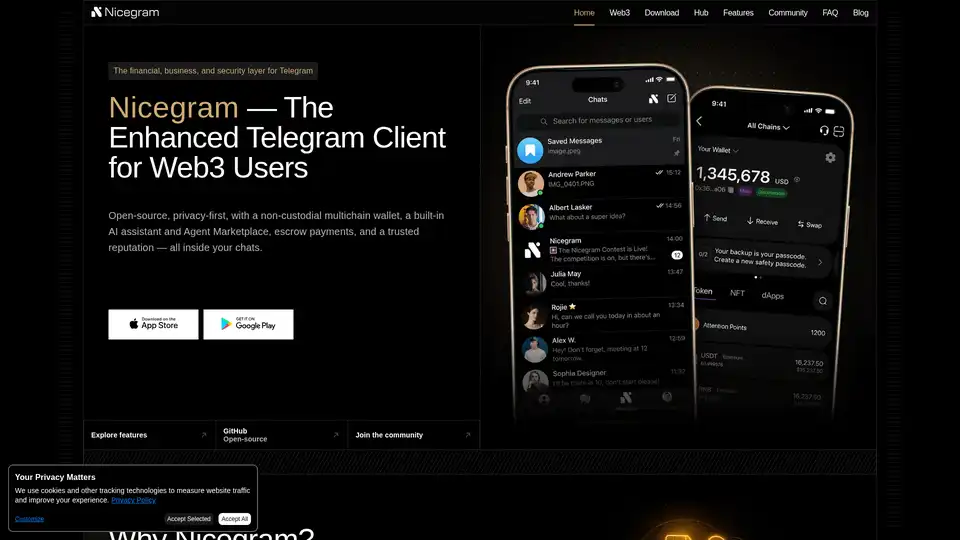
Overview of Nicegram
What is Nicegram?
Nicegram is an enhanced, open-source Telegram client designed specifically for Web3 users, businesses, and security-conscious individuals. Unlike the standard Telegram app, Nicegram layers advanced financial tools, privacy features, and AI-powered automation directly on top of Telegram's robust backend infrastructure. This ensures full compatibility with all Telegram updates and contacts while offering a specialized environment for secure communication, decentralized finance (DeFi), and professional workflow management.
Key Features of Nicegram
Nicegram's core value proposition lies in its comprehensive suite of features that transform Telegram from a simple messaging app into a secure financial and business hub. Below are the primary capabilities that set it apart.
1. Non-Custodial Multichain Wallet
At the heart of Nicegram is a built-in, non-custodial multichain wallet. This means you maintain full control over your private keys and assets directly within the chat interface.
- Self-Custody: Your funds are not held by a third party; you are the sole owner.
- Multi-Chain Support: Manage assets across different blockchains seamlessly.
- In-Chat Financial Operations: Perform P2P transactions, mass payouts, and invoice generation without leaving the app.
- DeFi Integration: Access decentralized exchanges for swaps and trading.
- Escrow Services: Secure deals with milestone-based escrow and arbitration features, ideal for freelancers and businesses.
2. Built-in AI Assistant & Agent Marketplace
Nicegram integrates AI to automate and enhance communication and workflows.
- AI Assistant: Capable of summarizing long conversations, translating messages in real-time, and suggesting quick replies or templates for consistent communication.
- HyperLancer AI: A specialized AI agent marketplace integrated within the app, connecting users with AI tools for tasks like task routing, reporting, and smart automation.
- AI Teammates: For businesses, these AI agents act as virtual team members within Slack-like team spaces, handling routine queries and data organization.
3. Advanced Privacy & Security Tools
Privacy is a cornerstone of Nicegram, offering features beyond standard encryption.
- Double Bottom Mode: A unique feature that hides sensitive chats and accounts with an additional layer of security, accessible only via a specific passcode.
- Privacy by Default: The platform is open-source (code available on GitHub), ensuring transparency. It collects minimal metadata and respects user data control.
- Anti-Impersonation: NiceID and NiceScore systems prevent scammers from copying historical profiles or badges, ensuring reputation is tied to the actual Telegram handle.
4. Business Identity & Reputation System
For professionals and freelancers, Nicegram offers tools to build and verify reputation.
- NiceID: A soulbound (non-transferable) identity anchored to your Telegram account, including a portfolio, rates, and public reviews.
- NiceScore: A reputation metric built on real deliverables, successful escrows, and client feedback.
- Optional KYC/KYB: Ability to add verified certifications from trusted issuers for enhanced trust.
5. Team Hub & Collaboration
Nicegram acts as a productivity suite for teams, akin to Slack but within Telegram.
- Team Spaces: Dedicated workspaces with chats, calls, file sharing, wikis, role-based permissions, and audit trails.
- Automations & Integrations: Create custom pipelines for task management and receive real-time reporting.
- Paid Features: Flexible billing for team seats and storage bundles that include AI credits.
How Does Nicegram Work?
Nicegram operates as a standalone client that interfaces directly with Telegram's API. When you download and install Nicegram, you log in using your existing Telegram account. All your chats, contacts, and groups are imported instantly.
- Backend: It relies on Telegram's infrastructure for messaging and contact storage, ensuring you never lose your network.
- On-Top Layer: Nicegram's proprietary code adds the wallet, AI modules, and privacy tools. These features are processed locally or through Nicegram's secure servers without accessing the content of your messages (End-to-End encryption is maintained by Telegram).
- Open Source Transparency: Because the code is public on GitHub, the community can audit the security practices, reinforcing trust.
Who is Nicegram For?
Nicegram is tailored for a specific audience seeking more than just messaging:
- Web3 & Crypto Users: Ideal for traders and DeFi enthusiasts who need a secure, mobile-friendly wallet integrated with their daily communication tool.
- Freelancers & Remote Workers: Professionals handling payments and contracts via Telegram can use the escrow feature and NiceID reputation system for secure dealings.
- Businesses & Teams: Small to medium-sized enterprises can use Team Spaces for internal communication, project management, and AI-powered automation.
- Security-Conscious Individuals: Users who prioritize data privacy and want advanced features like hidden chats and minimal metadata collection.
- Content Creators & SocialFi Participants: Creators building their audience on Telegram can leverage the financial tools and reputation systems to monetize their work.
How to Use Nicegram?
Getting started with Nicegram is straightforward:
- Download: Visit the official Nicegram website or app stores to download the client. It is available for iOS, Android, and Desktop.
- Login: Use your phone number to log in exactly as you would with the standard Telegram app.
- Setup Wallet: Navigate to the wallet section to create or import a non-custodial wallet. Secure your recovery phrase carefully.
- Explore Features: Enable features like Double Bottom for privacy or set up a Team Space for collaboration.
- Join the Community: Connect with other users via Nicegram's official channels on Telegram, X (Twitter), and other social platforms for support and updates.
Why Choose Nicegram?
Choosing Nicegram means opting for a feature-rich, secure, and future-proof messaging environment. It bridges the gap between traditional messaging and the emerging Web3 economy. Unlike the standard Telegram client, Nicegram offers financial sovereignty, AI-driven efficiency, and a verifiable reputation system—all while maintaining the familiar Telegram user experience. Whether you are looking to trade crypto safely within a chat or manage a distributed team, Nicegram provides the tools to do so securely and efficiently.
Tags Related to Nicegram
