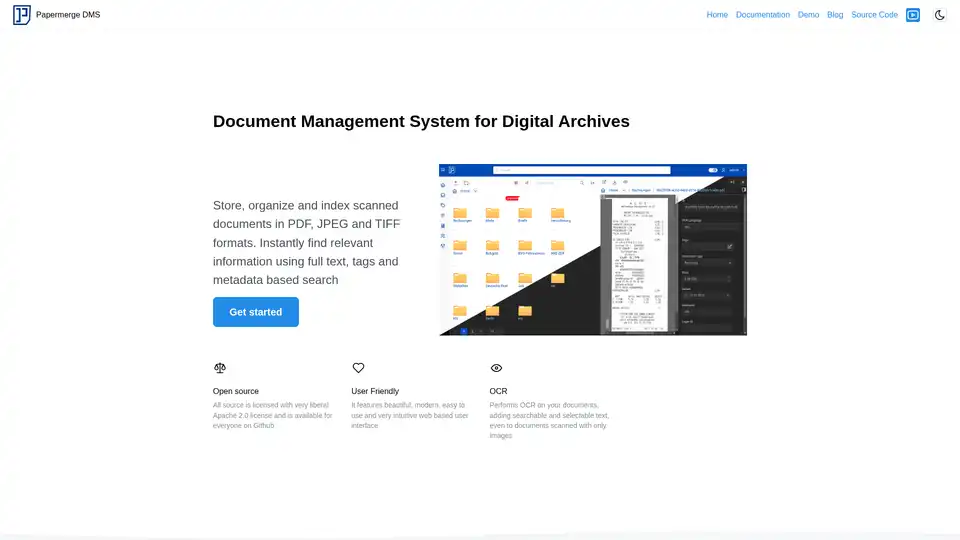
Papermerge DMS: Open Source Document Management System

Papermerge DMS

3.5 | 373 | 0
Type:
Open Source Projects
Last Updated:
2025/10/13
Description:
Papermerge DMS is an open-source document management system for digital archives. It offers OCR, indexing, versioning, and metadata-based search to organize and find documents easily.
Share:
document management
OCR
digital archiving
open source DMS
document indexing

Overview of Papermerge DMS

Papermerge DMS: Your Open Source Document Management Solution

What is Papermerge DMS? Papermerge DMS is an open-source document management system designed to help you store, organize, and index scanned documents in various formats such as PDF, JPEG, and TIFF. It's a user-friendly solution that enables you to instantly find relevant information through full-text search, tags, and metadata.

Key Features:

  • Open Source: Licensed under the Apache 2.0 license, the source code is freely available on GitHub, encouraging community contributions and transparency.
  • User-Friendly Interface: Features a modern, intuitive web-based interface, making document management a seamless experience.
  • Optical Character Recognition (OCR): Performs OCR on your documents, adding searchable and selectable text to image-based scans using the Tesseract engine, supporting over 100 languages.
  • Versioning: Keeps track of every document version, ensuring that you always have access to the original and any subsequent modifications.
  • Custom Fields (Metadata): Allows you to define custom attributes for document categories, enabling you to assign metadata such as price, date of issue, or custom IDs.
  • Categories: Organize documents by assigning them to specific categories like "Receipt," "Invoice," or "Contract."
  • Page Management: Provides tools to reorder, rotate, and extract pages within documents, fixing scanning errors without rescanning.

How does Papermerge DMS work?

  1. Document Upload: Upload your scanned documents in PDF, JPEG, or TIFF format.
  2. Automatic OCR: Papermerge DMS automatically performs OCR, making the text searchable.
  3. Indexing: The system indexes your documents, allowing for quick and accurate searches.
  4. Categorization: Assign documents to categories and add custom metadata.
  5. Version Control: Every change creates a new version, preserving the document history.

Why choose Papermerge DMS?

  • Efficiency: Quickly find documents using full-text search, tags, and metadata.
  • Organization: Keep your digital archives neatly organized with categories and custom fields.
  • Accessibility: Access your documents from anywhere with a web browser.
  • Control: Benefit from versioning and page management features.

Who is Papermerge DMS for?

Papermerge DMS is ideal for:

  • Individuals looking to digitize and organize their personal documents.
  • Small businesses needing a cost-effective document management solution.
  • Organizations requiring robust version control and metadata management.

Practical Use Cases:

  • Receipt Management: Categorize and track receipts by price, date, and issuer.
  • Contract Management: Store and manage different versions of contracts with custom IDs.
  • Invoice Processing: Organize invoices by vendor, date, and amount.

Setting Up Papermerge DMS:

Refer to the official documentation for detailed setup instructions. The documentation covers installation, configuration, and usage.

User Experience:

Papermerge DMS offers an intuitive and modern web interface, making document management a pleasant experience. Its features are designed to boost productivity and streamline workflows.

Papermerge DMS Benefits:

  • Improved Efficiency: Quickly locate documents using powerful search capabilities.
  • Enhanced Organization: Keep digital archives neatly organized with categories and custom fields.
  • Increased Accessibility: Access documents from anywhere with a web browser.
  • Robust Version Control: Benefit from versioning and page management features.

Security Considerations:

As an open-source system, it's important to follow security best practices when deploying Papermerge DMS. Ensure the server is properly configured and secured.

By adopting Papermerge DMS, you can transform your document management processes, reduce clutter, and improve overall efficiency. Its robust feature set and user-friendly interface make it an excellent choice for anyone looking to digitize and organize their documents. It provides an efficient way to index your documents, helping you to manage them better.

Best Alternative Tools to "Papermerge DMS"

TheToolBus.ai
No Image Available
463 0

Discover TheToolBus.ai: Free online tools for PDFs, images, calculators, converters, and marketing. AI-powered features like image to text and background removal. No signup, fast, and efficient for everyday tasks.

image background removal
The Drive AI
No Image Available
360 0

The Drive AI: AI-powered agentic workspace that transforms file management. Create intelligent agents to understand, analyze, and automate document processing. Try it free!

AI file management
agentic workspace
DeepSeek OCR
No Image Available
420 0

DeepSeek OCR is an AI-powered online tool offering 97% accuracy in extracting text, formulas, and tables from images. It supports multiple languages, requires no installation, and boasts ultra-low token consumption.

AI OCR
text extraction
FPT.AI
No Image Available
434 0

FPT.AI provides AI solutions transforming businesses into AI-first organizations, offering virtual assistants, digital workforce solutions, and operational excellence tools.

virtual assistant
chatbot
Renamer.ai
No Image Available
311 0

Renamer.ai is an AI-powered tool that automatically renames files based on their content, using OCR and intelligent analysis. It supports multiple file types and languages, offering both a desktop app and a web interface.

AI file renaming
Search+
No Image Available
296 0

Transform how you interact with PDF documents - extract insights, analyze relationships, and make better decisions instantly with our AI-powered document intelligence platform.

document analysis
Peslac AI
No Image Available
205 0

Peslac AI streamlines document processing with intelligent automation, extracting data, verifying documents, and processing forms efficiently. It serves various industries, increasing efficiency by 90%.

document processing
data extraction
Copywrite
No Image Available
542 0

Convert handwriting to text with Copywrite. Fast, accurate AI-powered conversion for notes and documents. Edit and organize in the cloud.

handwriting recognition
OCR
Wondershare
No Image Available
420 0

Wondershare provides AI-powered creativity, productivity, and utility solutions, including Filmora, PDFelement, Recoverit, and Virbo, to revolutionize content creation across video, audio, image, and text.

video editing
PDF management
TopPDF
No Image Available
558 0

TopPDF offers AI-powered PDF editing, conversion, translation, and compression tools. Trusted by millions, it simplifies PDF workflows and boosts productivity. Convert, edit, translate PDFs online now!

PDF editor
PDF converter
SwifDoo PDF
No Image Available
213 0

SwifDoo PDF is an AI-powered, all-in-one PDF solution for editing, converting, viewing, compressing, merging, and e-signing PDF documents across multiple platforms. It offers efficient AI features for summarizing, translating, and proofreading PDFs.

PDF editor
PDF converter
Veryfi
No Image Available
523 0

OCR API for data extraction, mobile SDK for document capture, and toolkits to liberate trapped data in your unstructured documents like invoices, bills, purchase orders, checks (cheques) and receipts in real-time.

document extraction
invoice OCR
DocXter
No Image Available
475 0

DocXter is an AI-powered tool that helps you extract valuable insights from any document. Upload, ask questions, simplify language, and more. Loved by thousands!

document analysis
AI assistant
StructiFi
No Image Available
600 0

StructiFi is an AI-powered tool that extracts structured data from images, PDFs, and Word documents. It offers OCR functionality and converts files into JSON, Table, or Markdown formats. Ideal for data analysis and insights.

OCR
data extraction
