
PDF Candy
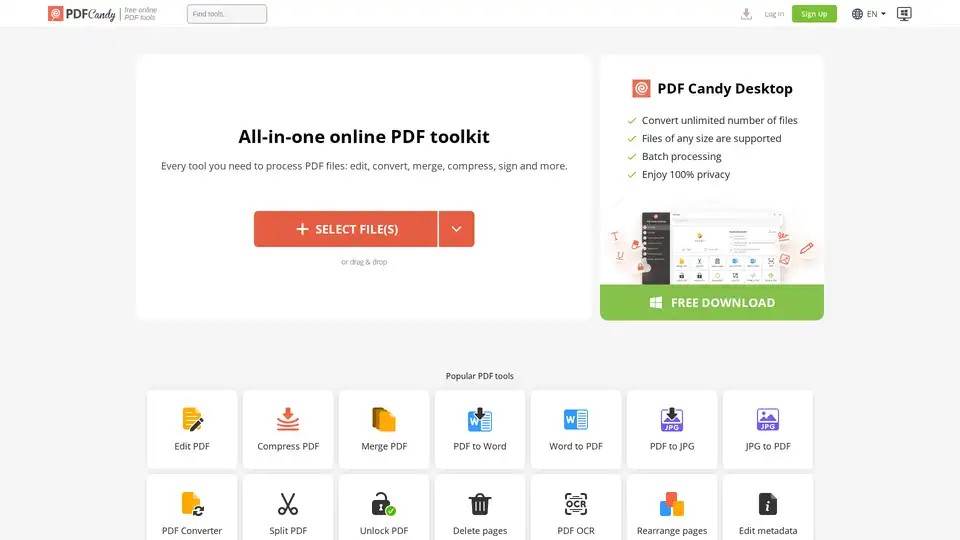
Overview of PDF Candy
PDF Candy: Your All-in-One Online PDF Toolkit
What is PDF Candy?
PDF Candy is a comprehensive online platform that offers a wide array of free tools designed to process PDF files. Whether you need to edit, convert, merge, compress, or perform other operations on your PDFs, PDF Candy provides a user-friendly and accessible solution. With a vast collection of features, it stands out as one of the most versatile online PDF toolkits available.
How does PDF Candy work?
PDF Candy works by providing a suite of web-based tools that allow users to upload, process, and download PDF files directly from their browser. The platform supports a wide range of functions, including:
- Editing PDF: Modify text, add annotations, and make other changes to your PDF documents.
- Converting PDF: Transform PDFs into various formats such as Word, JPG, and more.
- Merging PDF: Combine multiple PDF files into a single document.
- Compressing PDF: Reduce the file size of your PDFs without sacrificing quality.
- Splitting PDF: Divide a single PDF file into multiple smaller files.
- Unlocking PDF: Remove password protection from your PDFs.
Simply select the desired tool, upload your file, and follow the on-screen instructions to complete the process. PDF Candy ensures that your files are processed securely and kept on their servers for a maximum of two hours to comply with GDPR regulations.
Key Features of PDF Candy
- Wide Range of Tools: PDF Candy offers over 90 online PDF tools, catering to almost every PDF-related task.
- User-Friendly Interface: The platform is designed to be intuitive and easy to use, even for those with limited technical knowledge.
- Free Access: Most of the tools available on PDF Candy are free to use, making it an accessible option for users on a budget.
- Privacy Focused: PDF Candy is committed to protecting user privacy and adheres to GDPR regulations by storing files for a limited time.
- Desktop Version: For users who prefer offline processing, PDF Candy offers a desktop version with additional features such as batch processing and support for larger files.
Why Choose PDF Candy?
- Versatility: With a comprehensive suite of tools, PDF Candy can handle a wide variety of PDF-related tasks, eliminating the need for multiple specialized applications.
- Convenience: Being an online platform, PDF Candy can be accessed from any device with an internet connection, providing unparalleled convenience.
- Cost-Effective: The free access to most of its tools makes PDF Candy an ideal choice for individuals and small businesses looking to save on software costs.
- Security: PDF Candy prioritizes user privacy and employs robust security measures to ensure that your files are processed safely.
PDF Candy Desktop
For users requiring more advanced features and offline capabilities, PDF Candy offers a desktop version. This version supports:
- Unlimited File Processing: Convert an unlimited number of files.
- Large File Support: Handle files of any size.
- Batch Processing: Process multiple files simultaneously.
- Enhanced Privacy: Enjoy 100% privacy as files are processed locally on your computer.
Who is PDF Candy for?
PDF Candy is suitable for a wide range of users, including:
- Students: For editing, converting, and managing research papers and assignments.
- Professionals: For creating, editing, and sharing business documents.
- Small Businesses: For managing invoices, contracts, and other important paperwork.
- Anyone who needs to work with PDF files: Whether you're a casual user or a power user, PDF Candy has the tools you need to get the job done.
How to use PDF Candy?
Using PDF Candy is straightforward. Here’s a step-by-step guide:
- Go to the PDF Candy website.
- Select the tool you need from the homepage (e.g., "PDF to Word", "Merge PDF", etc.).
- Upload your PDF file by dragging and dropping it or selecting it from your computer.
- Follow the on-screen instructions to customize the process.
- Download the processed file once the task is completed.
Conclusion
PDF Candy is a versatile and user-friendly online PDF toolkit that offers a wide range of tools for processing PDF files. Whether you need to edit, convert, merge, or compress PDFs, PDF Candy provides a convenient and cost-effective solution. Its commitment to privacy and security makes it a trusted choice for individuals and businesses alike. With its intuitive interface and comprehensive feature set, PDF Candy is an excellent option for anyone looking to streamline their PDF workflows.
Best way to process PDF files? Use PDF Candy's diverse range of tools for editing, converting, and managing your documents efficiently and securely.
Tags Related to PDF Candy
