
Pixel Art Maker
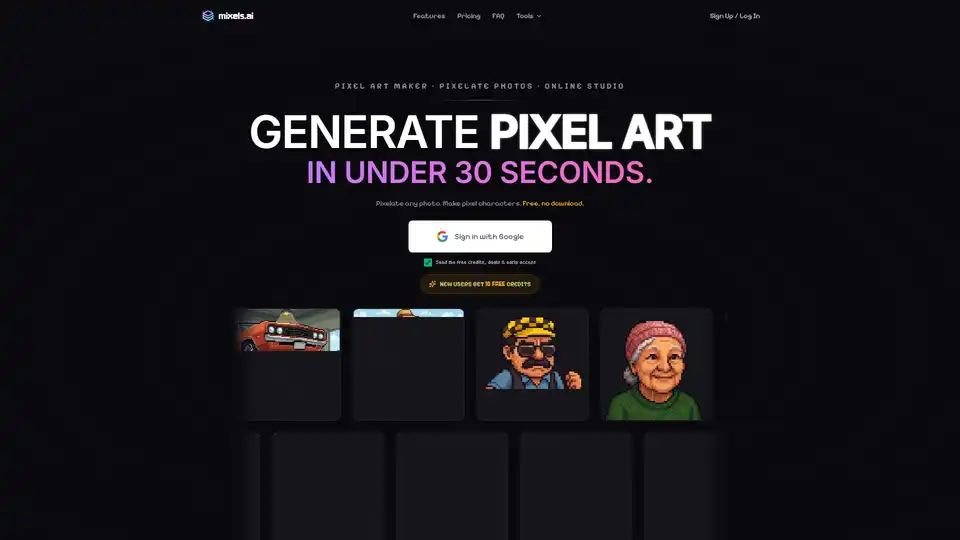
Overview of Pixel Art Maker
What is Mixels.ai: The Ultimate AI Pixel Art Maker?
Mixels.ai is a revolutionary online platform designed to empower artists, hobbyists, and game developers to create stunning pixel art with unprecedented ease and speed. Leveraging advanced artificial intelligence, Mixels.ai transforms ordinary images and textual prompts into authentic 8-bit style pixel art, characters, and game sprites in mere seconds. It's a free, browser-based studio that eliminates the need for complex software downloads, making high-quality pixel art accessible to everyone, from beginners to seasoned professionals.
Historically, creating pixel art was a painstaking process, requiring artists to meticulously place each pixel to achieve the desired effect. This often demanded significant time, skill, and patience. Mixels.ai changes this paradigm, offering an intuitive, AI-driven solution that democratizes pixel art creation, allowing users to focus more on their creative vision and less on the technical complexities.
Key Features of Mixels.ai
Mixels.ai stands out with a suite of powerful features designed to streamline the pixel art creation workflow:
1. AI-Powered Pixel Art Generation
At its core, Mixels.ai utilizes sophisticated AI algorithms that 'understand' pixel aesthetics. This ensures that the generated output isn't just a blurred or distorted image, but rather a truly pixel-perfect rendition with consistent style and optimal grid alignment. The AI intelligently interprets commands to produce genuine 8-bit avatars, retro game sprites, and custom pixel art that captures the nostalgic charm of classic digital graphics.
2. Effortless Image & Photo Pixelation
Turn any photograph or image into a vibrant pixel art masterpiece. Simply upload your desired image, and Mixels.ai's AI will convert it into a pixelated version, maintaining key features while imbuing it with a distinct 8-bit character. This feature is perfect for adding a retro touch to modern photos or creating unique artistic effects.
3. Dynamic Pixel Character & Avatar Creation
Generate unique pixel characters and 8-bit avatars for profile pictures, online personas, or storytelling. The platform offers customizable parameters, allowing users to define specific traits like category (Human, Animal, Fantasy, Sci-Fi), type (Scientist, Boss Enemy), skin tone, hair color, apparel, and intricate details such as "thick glasses" or "pocket protector." This level of detail ensures that each character is distinct and aligns perfectly with your creative vision.
4. Retro Game Sprite Generator
For game developers, Mixels.ai is an invaluable asset. It can generate high-quality retro game sprites in seconds, compatible with popular game engines like Unity, Godot, Unreal, GameMaker, and Phaser. The ability to quickly create diverse sprites—from player characters and enemies to environmental elements—significantly accelerates game development cycles, especially for indie studios and hobbyists.
5. Embedded Metadata for Seamless Asset Management
One of the unique advantages of Mixels.ai is its capability to embed EXIF-style metadata directly into generated asset files (e.g., PNG-24 with Alpha). This metadata can include details like dimensions (e.g., 64x64), category, keywords (e.g., geek, nerd, genius, villain, scientist), and a descriptive prompt, facilitating effortless asset organization and management within complex projects or game development pipelines.
6. Browser-Based & Free Access
Mixels.ai operates entirely online, meaning there's no software to download or install. This provides universal accessibility; users can create pixel art from any device with an internet connection. Furthermore, the platform offers free access with an initial allocation of 10 free credits for new users, making it a highly accessible tool for experimentation and creation.
How Does Mixels.ai Work?
The process of creating pixel art with Mixels.ai is remarkably straightforward:
- Access the Online Studio: Navigate to mixels.ai in your web browser.
- Sign In (Optional but Recommended): You can sign in with your Google account to receive free credits and access more features.
- Choose Your Creation Method:
- Upload a Photo: Select an image from your device to pixelate.
- Use Text Prompts: Describe the pixel art you want to create using natural language. For example, a prompt like "Create a pixel-art avatar of a nerdy geek with ambitions of world domination. Thick glasses, messy hair, wearing a lab coat with pocket protector" can yield highly specific results.
- Refine with Customization (for characters): Adjust specific attributes like character category, type, skin tone, hair color, apparel, and additional details to fine-tune your creation.
- Generate: Click the generate button, and the AI will process your request, producing your pixel art in under 30 seconds.
- Download with Metadata: Download your pixel art, complete with embedded metadata, for easy integration into your projects.
The platform's intuitive interface allows for quick iterations and experimentation, enabling users to explore various styles and concepts without extensive manual effort.
Who Is Mixels.ai For?
Mixels.ai is a versatile tool catering to a broad audience:
- Digital Artists & Illustrators: For rapidly prototyping pixel art concepts, exploring different styles, or adding a unique retro flair to their portfolio.
- Hobbyists & Enthusiasts: Anyone with an interest in pixel art or retro aesthetics can easily create personalized avatars, social media graphics, or digital art pieces for fun.
- Independent Game Developers (Indie Devs): Crucial for creating consistent, high-quality sprites, character sheets, and environmental assets for 2D games, significantly reducing development time and costs.
- Content Creators & Streamers: For generating distinctive branding elements, emotes, or profile pictures that stand out.
- Educators & Students: As a tool for learning about digital art, game design, or exploring AI's creative capabilities in a user-friendly environment.
Why Choose Mixels.ai for Your Pixel Art Needs?
Choosing Mixels.ai offers several compelling advantages:
- Speed and Efficiency: Generate complex pixel art in seconds, a process that could take hours or days manually.
- Accessibility: As a free, online tool, it's available to anyone with an internet connection, eliminating barriers to entry like expensive software.
- Quality and Consistency: The AI ensures pixel-perfect output with consistent style and grid alignment, crucial for professional-looking assets, especially in game development.
- Creative Freedom: While AI-driven, the platform offers ample customization through prompts and specific attributes, giving users significant control over the final output.
- Enhanced Workflow: Embedded metadata simplifies asset management, a feature often overlooked but vital for large projects.
- Cost-Effectiveness: Free credits and a browser-based model make it an economical choice for both personal and commercial projects.
Best Way to Maximize Your Mixels.ai Experience
To get the most out of Mixels.ai:
- Be Specific with Prompts: The more detailed your text prompts, the better the AI can understand and generate what you envision. Experiment with different descriptive words and phrases.
- Utilize Customization Options: Don't just rely on prompts. For character creation, delve into the category, type, skin, apparel, and detail options to sculpt your pixel art precisely.
- Explore the Community Creations: The platform showcases pixel art created by other users. Browsing these can offer inspiration and ideas for your own projects, demonstrating the diverse capabilities of the AI pixel art maker.
- Experiment with Image Inputs: Try various types of photos – portraits, landscapes, objects – to see how the AI transforms them into pixel art.
Mixels.ai is not just a tool; it's a creative partner that empowers you to bring your pixelated visions to life faster and more efficiently than ever before. Whether you're making a profile picture, designing game characters, or simply exploring the charm of 8-bit art, Mixels.ai offers a robust and user-friendly solution to unleash your creativity.
Tags Related to Pixel Art Maker
