
Premiere Assistant
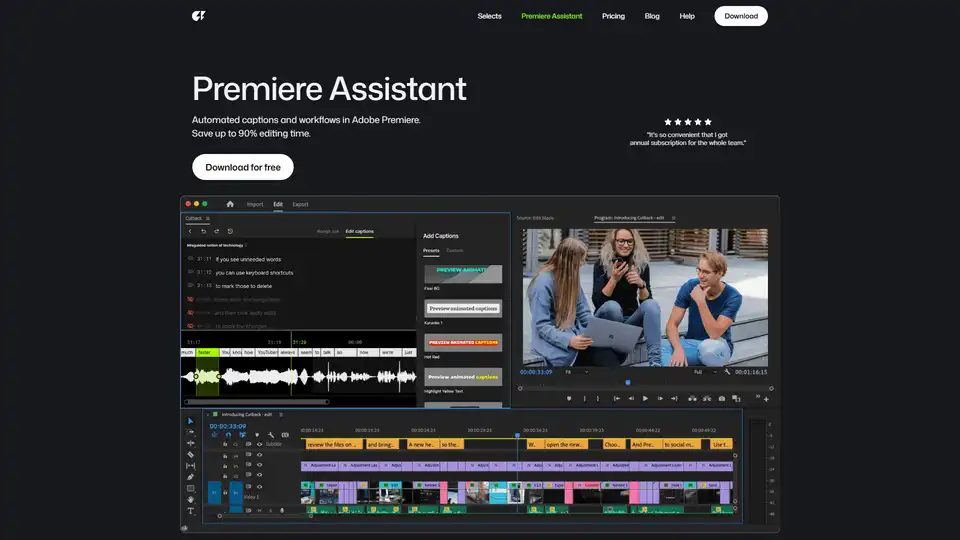
Overview of Premiere Assistant
What is Premiere Assistant by Cutback?
Premiere Assistant, developed by Cutback, is an innovative AI-powered plugin designed to seamlessly integrate with Adobe Premiere Pro. It acts as your ultimate video editing co-pilot, meticulously engineered to automate and streamline the most repetitive and time-consuming tasks within your post-production workflow. The core promise of Premiere Assistant is to dramatically boost your productivity by up to 300% and save you as much as 90% of your editing time, allowing you to reallocate valuable hours towards creative storytelling rather than mundane operations.
In a fast-paced content creation landscape, editors, studios, and content creators are constantly looking for ways to accelerate their output without compromising quality. Premiere Assistant addresses this critical need by leveraging advanced artificial intelligence to handle everything from initial raw footage processing and multi-camera setup to precise transcription, translation, and sophisticated visual effects.
Key Features of Premiere Assistant: Revolutionizing Your Video Editing Workflow
Premiere Assistant is packed with a suite of powerful features designed to simplify complex editing processes and enhance your creative control within Adobe Premiere Pro.
Automated Workflow Management
Forget about hours spent on tedious organizational tasks. Premiere Assistant intelligently automates numerous aspects of your workflow, ensuring efficiency from the very beginning of your project.
- Trim Video: Engage with the AI assistant to automatically sift through raw footage, identifying and selecting the best takes, cutting out unnecessary sections, and even highlighting prime moments for short-form content. This intelligent trimming process significantly reduces the time spent on initial footage review.
- Auto Multi-cam Switching: For projects involving multiple cameras, Premiere Assistant eliminates the need for manual track selection. It automatically switches video tracks based on who is speaking, simultaneously muting unneeded audio tracks. This feature is a game-changer for interviews, podcasts, and event coverage, allowing you to edit multiple tracks within a single sequence effortlessly.
Advanced Audio and Text Processing
The ability to accurately transcribe and translate audio is crucial for accessibility and global reach. Premiere Assistant offers unparalleled precision in these areas.
- Transcribe: Achieve up to 100% accuracy in transcription, converting spoken words into editable text directly within Premiere Pro. This "edit video like a doc" functionality empowers you to make cuts, rearrange content, and refine timing by manipulating text, making the editing process intuitive and remarkably fast.
- Translate: Expand your audience base with a single-click video translation feature, supporting up to 29 languages. This not only generates translated captions but can also facilitate the creation of dubbed content, making your videos accessible to a worldwide audience without extensive manual effort.
- Remove Silences: Dead air and silent pauses can disrupt the flow of a video. Premiere Assistant precisely identifies and automatically cuts out all silent parts across multiple video and audio tracks, even in hours of footage. This ensures a tight, engaging narrative and saves countless hours of manual trimming.
Visual Effects and Motion Graphics Made Easy
Free yourself from the repetitive work involved in visual effects and motion graphics. Premiere Assistant provides a diverse range of tools, effects, and motion presets that enable you to focus on the creative vision of your video.
- Animated Captions: Elevate your captions from static text to dynamic visual elements with just two clicks. Choose from various stunning presets, including word-for-word, karaoke-style, and depth effects, to add an engaging layer to your storytelling.
- Remove Background: Perform a one-click background removal for both video and still images. This powerful feature allows you to create stunning depth effects and composite shots in seconds, transforming ordinary footage into professional-looking content.
- Edit Photos: Don't let low-resolution images or incorrect aspect ratios hinder your project. Premiere Assistant can improve low-resolution images, remove image backgrounds, and effortlessly swap portrait-oriented photos to landscape, ensuring all your visual assets are perfectly optimized.
- Animate Anything: Add captivating motion to any element in your video. With just a click, animate images, text, and video clips with popular effects like "Pop," "Jiggle," and "Bounce," injecting life and energy into your visuals.
How Does Premiere Assistant Work? The Power of AI in Your Edit Suite
Premiere Assistant harnesses cutting-edge artificial intelligence and machine learning algorithms to perform its functions. While the precise technical details are proprietary, the underlying principles involve:
- Speech-to-Text (STT) and Natural Language Processing (NLP): For transcription and intelligent trimming, the AI analyzes audio waveforms and spoken language patterns to convert speech into highly accurate text. NLP models then help in understanding context for tasks like identifying highlights or speaker changes.
- Computer Vision and Object Recognition: Features like background removal and photo editing utilize advanced computer vision techniques to identify subjects within video frames and images, separating them from their backgrounds with precision. It also helps in analyzing visual cues for multi-cam switching and animation.
- Pattern Recognition and Automation Scripts: The AI learns from common editing patterns and can execute complex sequences of actions (like multi-cam switching or silence removal) automatically, based on predefined rules and learned behaviors, integrated directly into Premiere Pro's API.
This sophisticated AI integration means the assistant not only automates tasks but also performs them with a level of accuracy and speed that surpasses manual methods, operating seamlessly within your familiar Premiere Pro environment.
Who is Premiere Assistant For? Target Audience and Practical Value
Premiere Assistant is a versatile tool designed for a broad spectrum of professionals and organizations within the video production ecosystem.
Target Audience:
- Studios and Broadcast Companies: Streamline large-scale productions, manage multi-cam projects efficiently, and ensure consistent content quality.
- Professional Creators and YouTubers: Focus on creative ideas, expand reach with multi-language content, and drastically cut down on post-production time.
- Freelancers: Take on more projects, deliver faster, and offer a wider range of services with enhanced efficiency.
- Agencies: Improve client project turnaround times and maintain high-quality output for various campaigns.
Practical Value:
- Unprecedented Time Savings: As attested by users like Studio MODAK ("The workload has reduced significantly") and VIDEOCLASS ("Wow.. this is crazy! Getting the annual plan for the whole team."), the tool can save up to 90% of editing time. This translates to hours of work completed in minutes, drastically improving project delivery schedules.
- Enhanced Productivity: By offloading repetitive and mundane tasks, editors are free to dedicate their energy to the creative aspects of storytelling, fostering innovation and higher-quality content.
- Superior Accuracy and Quality: Premiere Assistant boasts one of the highest speech-to-text transcription accuracy products, ensuring professional-grade captions and subtitles. Its visual tools also guarantee polished results.
- Global Content Reach: The 1-click translation feature removes language barriers, enabling creators to reach and engage diverse international audiences effortlessly.
- Scalability: For teams and studios, the ability to automate core processes means higher output capacity without necessarily increasing staffing, leading to better resource utilization.
Why Choose Premiere Assistant? Unmatched Precision and Community Focus
When selecting an AI-powered editing tool, reliability and effectiveness are paramount. Premiere Assistant stands out for several compelling reasons:
- Excellence in Details: Cutback emphasizes precision, offering industry-leading speech-to-text transcription accuracy suitable for everything from short-form social media content to full-length VOD platforms.
- Community Driven Development: The product's evolution is heavily influenced by feedback and ideas from a professional editing community. This ensures that Premiere Assistant continually adapts to real-world editing challenges and user needs, pushing the boundaries of productivity.
- Official Adobe Video Partner: This partnership signifies a high level of integration, compatibility, and trust with Adobe, guaranteeing a stable and reliable experience within Premiere Pro.
User Testimonials: Real-World Impact
The transformative power of Premiere Assistant is echoed in the glowing feedback from its users:
- "My workload has decreased by 90%. I want to keep this to myself."
- "It's so convenient that I got annual subscription for the whole team."
- "Video editing has become a breeze with Cutback."
- "Wow.. this is crazy! Getting the annual plan for the whole team." - VIDEOCLASS | #1 Video editing lecture channel
- "Thank you so much for creating Cutback. The workload has reduced significantly." - Studio MODAK | Content production for Netflix
- "Tried for personal use, love it, and now the whole editing team is using it." - US Alliance
These testimonials underscore the significant time savings, ease of use, and overall improvement in workflow efficiency that Premiere Assistant delivers to individual editors and entire teams.
Getting Started with Premiere Assistant
Ready to transform your video editing workflow? Premiere Assistant offers a straightforward path to enhanced productivity. You can Download for free to experience its capabilities firsthand. Installation is designed to be simple, ensuring you can quickly integrate this powerful AI assistant into your Adobe Premiere Pro setup and begin automating tasks immediately. Comprehensive guides and a help center are also available to support you on your journey.
Conclusion: Unleash Your Creativity with AI-Powered Editing
Premiere Assistant by Cutback is more than just a plugin; it's a strategic partner for anyone looking to optimize their video editing process. By intelligently automating the repetitive aspects of post-production, it empowers creators to reclaim their time, enhance their output quality, and truly unleash their storytelling potential. Whether you're a seasoned professional or a growing content creator, Premiere Assistant offers an indispensable solution to navigate the demands of modern video production with unparalleled efficiency and creative freedom.
Tags Related to Premiere Assistant
