
Selects by Cutback
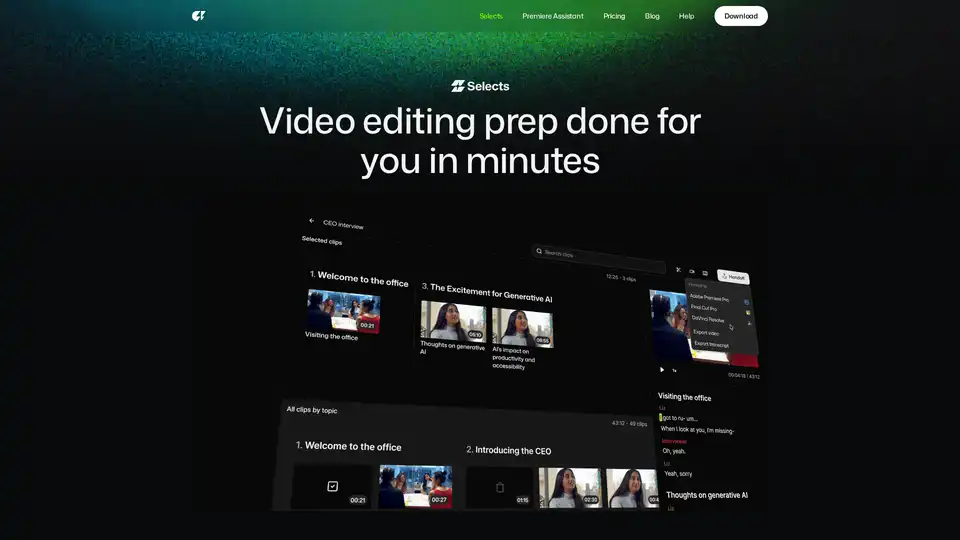
Overview of Selects by Cutback
What is Selects by Cutback?
Selects by Cutback is an innovative AI-powered tool designed to streamline the video editing process. It automates the initial 70% of editing work, including sorting, organizing, and reviewing footage, allowing creators and studios to focus on the creative aspects of their projects. This tool is particularly useful for handling large volumes of raw video data, making it an essential asset for professionals in the video production industry.
Key Features of Selects by Cutback
Automated Prep Phase
Selects by Cutback automates the prep phase of video editing, significantly reducing the time spent on mundane tasks. This includes:
- Multi-Cam Sync: Automatically syncs gigabytes of multi-cam files and switches cameras based on the speaker. Supports 4K and 360° videos.
- Smart Stringout with Chapters: Organizes footage into topic-based chapters, allowing for quick review of hours of footage.
- Precision Cutting: Enables users to search for specific moments using natural language, drag and drop clips, and cut unnecessary parts like silences and filler words with a single click.
Seamless Integration
Selects by Cutback seamlessly integrates with major video editing software:
- Adobe Premiere Pro: Project files are structured to fit your workflow, with color-coded chapters, markers, labels, and transcripts included.
- Final Cut: Ensures a smooth transition from Selects to Final Cut, maintaining all edits and organization.
- DaVinci Resolve: Supports a non-destructive editing process, giving users full control over their projects.
Storyline (Beta)
The Storyline feature, currently in beta, uses AI to turn prepped footage into story-driven rough cuts. This allows users to experiment with structure and pacing instantly, enhancing the creative process.
How Does Selects by Cutback Work?
- Drop Raw Videos: Upload your raw video files into Selects.
- Get Prepped in Minutes: The tool processes the footage, organizing it into chapters and syncing multi-cam files.
- Set Directions: Choose tasks for different types of projects, such as podcasts, livestreams, documentaries, or vlogs.
- Select and Cut with Precision: Use natural language search to find specific moments, drag and drop clips, and cut unnecessary parts.
- Handoff to Existing Workflow: Export the prepped footage to your preferred editing software for further refinement.
Use Cases
Selects by Cutback is versatile and can be used for various types of video content:
- YouTube Long-Form: Automates the syncing of footage and cutting between wide shots, close-ups, and reaction shots for long-form content.
- Podcasts: Quickly organizes and syncs multi-cam footage for podcasts, highlighting specific topics or moments.
- Interviews: Efficiently edits interview footage, cutting out silences and filler words.
- Vlogs: Streamlines the editing process for vlogs, making it easier to create engaging content.
- Talk Shows: Automates the syncing and editing of multi-cam footage for talk shows.
- Documentaries: Organizes and syncs footage for documentaries, making the editing process more efficient.
- Livestream Highlights: Quickly creates highlights from livestreams, saving time and effort.
- Educational Content: Automates the editing process for educational videos, making it easier to create high-quality content.
- Events: Streamlines the editing of event footage, making it easier to create polished videos.
Why Choose Selects by Cutback?
- Time-Saving: Reduces prep time by over 60%, allowing creators to focus on the creative aspects of their projects.
- Efficiency: Automates mundane tasks, making the editing process faster and more efficient.
- Integration: Seamlessly integrates with major video editing software, ensuring a smooth workflow.
- Precision: Enables precise editing with natural language search and drag-and-drop functionality.
- Versatility: Suitable for a wide range of video content, from podcasts to documentaries.
Who is Selects by Cutback For?
Selects by Cutback is ideal for:
- Video Editors: Professionals looking to streamline their editing process and save time.
- Content Creators: YouTubers, podcasters, and vloggers who want to focus on creating engaging content.
- Studios: Production studios that handle large volumes of video data and need an efficient editing solution.
- Educators: Teachers and trainers who create educational videos and need a quick and efficient editing tool.
Best Way to Use Selects by Cutback
To get the most out of Selects by Cutback, follow these steps:
- Upload Your Footage: Drop your raw video files into Selects.
- Set Your Directions: Choose the type of project you are working on and set your editing preferences.
- Review and Edit: Use the natural language search to find specific moments, drag and drop clips, and cut unnecessary parts.
- Export to Your Editing Software: Seamlessly handoff the prepped footage to your preferred editing software for further refinement.
- Share and Collaborate: Share the transcript for paper cuts or export the video if the rough cut is ready to go.
Conclusion
Selects by Cutback is a powerful AI tool that revolutionizes the video editing process. By automating the initial 70% of editing work, it allows creators and studios to focus on the creative aspects of their projects. With its seamless integration with major editing software and versatile use cases, Selects by Cutback is an essential tool for anyone involved in video production.
Tags Related to Selects by Cutback
