
Livesync
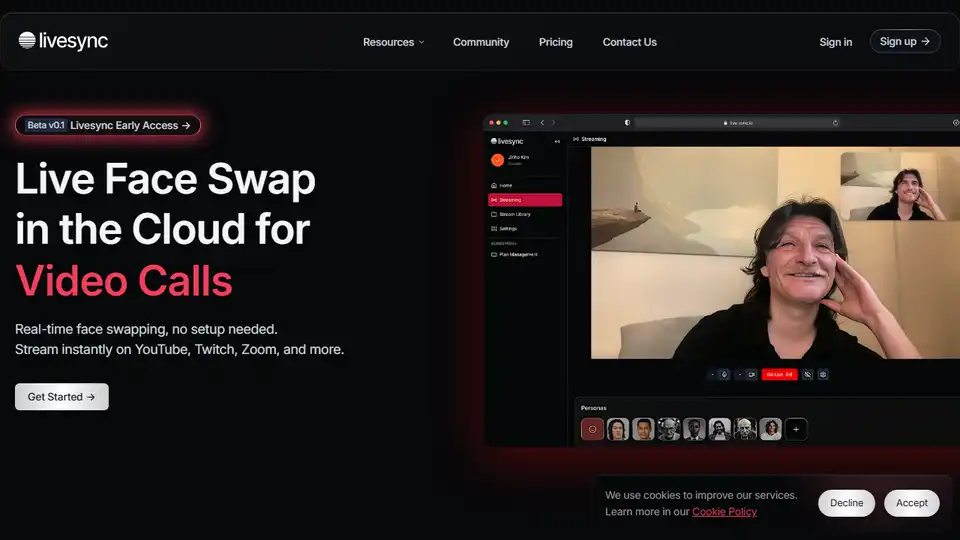
Overview of Livesync
What is Livesync?
Livesync is a cutting-edge, cloud-based tool that enables real-time face swapping for live streaming, video calls, and content creation. It is designed to provide seamless and hyper-realistic face transformations without requiring complex setups or high-end GPUs. This makes it accessible to a wide range of users, including streamers, YouTube creators, VTubers, and content creators.
Key Features of Livesync
- Real-Time Face Swapping: Livesync allows users to swap faces in real-time, making it ideal for live streaming and video calls.
- Cloud-Based Technology: No downloads or installations are needed. Users can access Livesync from any device, including computers, phones, and iPads.
- Hyper-Realistic Transformations: Utilizing advanced AI technology, Livesync delivers smooth and lifelike face swaps.
- Seamless Integration: Livesync integrates effortlessly with popular platforms like OBS, Zoom, and YouTube, providing a professional broadcasting environment.
- Customization: Enterprise clients can customize workflows through the API, integrating Livesync into their systems.
- Cost Efficiency: By utilizing multiple GPUs, Livesync delivers top performance affordably, allowing scalable usage without costly hardware.
How Does Livesync Work?
Livesync leverages cloud-based technology to provide real-time face swapping. Users can select their desired avatar with a single click, and the tool instantly transforms their face. This process is seamless and requires no complex setups or high-end GPUs, making it accessible to a wide range of users.
How to Use Livesync?
- Sign Up: Create an account on the Livesync platform.
- Select Avatar: Choose your desired avatar from the available options.
- Integrate with Platforms: Connect Livesync with your preferred platform (e.g., OBS, Zoom, YouTube).
- Start Streaming: Begin your live stream or video call with the face-swapped avatar.
Why Choose Livesync?
- Flexible Integration: Livesync is compatible with various platforms, making it versatile for different use cases.
- Accessibility: No installation is needed. Users can enjoy high-quality face-swapping anytime on any device.
- Cost Efficiency: Livesync offers affordable pricing plans, making it accessible to a wide range of users.
- Standard Security: Livesync is committed to responsible digital privacy, ensuring secure and ethical usage in all interactions.
Who is Livesync For?
Livesync is ideal for:
- Streamers: Enhance your live streams with unique and realistic characters.
- YouTube Creators: Add depth to your videos with lifelike characters that enhance storytelling.
- VTubers: Create engaging content with realistic avatars.
- Content Creators: Add a touch of creativity to your video calls and live streams.
- Marketers: Enhance your brand identity with realistic face swap technology.
- Educational Platforms: Engage participants in virtual events with lifelike avatars.
Best Way to Use Livesync
The best way to use Livesync is to integrate it with your preferred platform and start creating engaging content. Whether you are a streamer, YouTube creator, or content creator, Livesync provides the tools you need to enhance your live experiences with unique and realistic characters.
User Testimonials
- Lily Kim - Streamer: "I always thought I had a great face, but Livesync helped me turn it into a masterpiece."
- Mark Hughes - Technology Consultant: "I've tested plenty of AI face swap technologies, but nothing matches Livesync's speed and quality. It's unbelievably fast and reliable."
- Kaito Sato - Creative Director: "I always wanted to stream but hated showing my face. Livesync gave me the confidence boost I needed, and now, I'm living the dream."
Conclusion
Livesync is a powerful tool for real-time face swapping, offering seamless integration with popular platforms and hyper-realistic transformations. It is designed to enhance live experiences with unique and realistic characters, making it ideal for streamers, YouTube creators, VTubers, and content creators. With its cloud-based technology and affordable pricing plans, Livesync is accessible to a wide range of users, providing a professional broadcasting environment without the need for complex setups or high-end GPUs.
Tags Related to Livesync
