
Bank PDF Converter
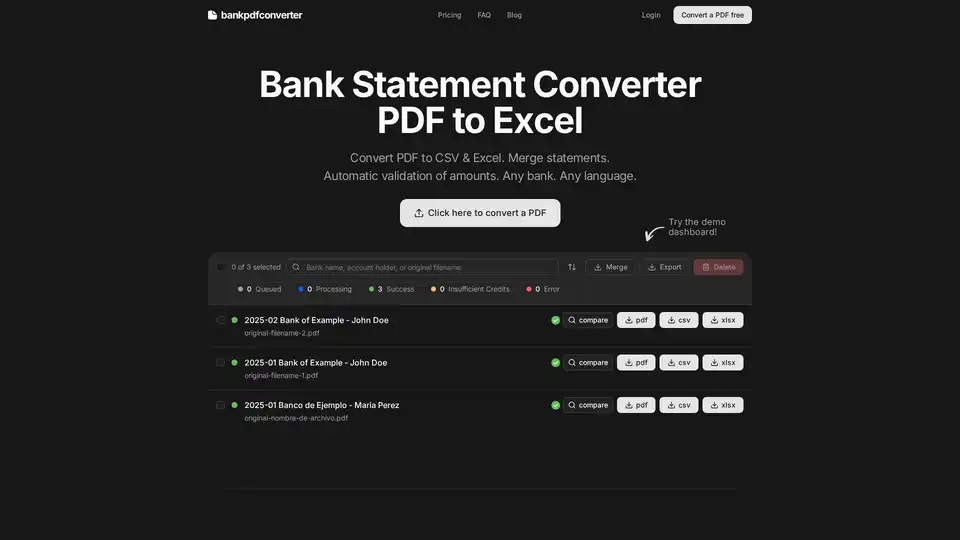
Overview of Bank PDF Converter
What is Bank PDF Converter?
Bank PDF Converter is a specialized web-based AI tool designed to automate the tedious process of converting bank statement PDFs into structured, editable formats like Excel (XLSX) and CSV. Developed for financial professionals, accountants, bookkeepers, and small business owners, it eliminates hours of manual data entry by using intelligent parsing and validation algorithms. Unlike generic PDF converters, this tool is specifically trained to understand the complex layouts, formats, and data structures found in bank statements from virtually any financial institution worldwide.
Key Features of Bank PDF Converter
This tool stands out due to its focus on accuracy and usability for financial data:
- Multi-Format Output: Easily convert statements to either Excel XLSX for further analysis or CSV for seamless import into accounting software, spreadsheets, or databases.
- Universal Bank Support: The tool is not limited to a specific list of banks. It is designed to parse and understand the formatting of statements from any bank in any language, making it ideal for international businesses or those dealing with multiple financial institutions.
- Automatic Transaction Validation: A core feature that sets it apart is automatic validation. The tool calculates opening and closing balances, verifies that all transactions sum correctly, and flags any discrepancies. This ensures data integrity and catches potential errors early.
- Batch Processing & Merging: Users can upload multiple PDFs at once. The tool can merge several statements into a single Excel or CSV file, which is invaluable for monthly or quarterly reporting that spans multiple accounts or periods.
- Side-by-Side Comparison: To build trust and ensure accuracy, the tool provides a visual comparison view. Users can see the original PDF on one side and the extracted data on the other, allowing for quick verification before finalizing the export.
- Smart File Organization: The tool automatically names output files using intelligent rules, incorporating the statement date, bank name, and account holder for easy organization and retrieval.
- Secure and Private: Security is paramount for financial data. Bank PDF Converter employs encryption in transit and at rest. Furthermore, files are automatically deleted after 72 hours, ensuring that sensitive financial information does not linger on servers.
How Does Bank PDF Converter Work?
The process is straightforward and designed for efficiency:
- Upload: Drag and drop or select your bank statement PDFs (multiple files are supported).
- Parse & Validate: The tool's AI engine parses the PDF layout, extracts all text and transaction data, and runs its validation algorithms to check amounts and balances.
- Review & Compare: Use the intuitive dashboard to review the extracted data. The side-by-side view allows you to compare the source PDF with the output to ensure everything is correct.
- Export: Choose your preferred format (Excel XLSX or CSV) and download the file. For merged statements, the data from all uploaded files will be combined into one organized file.
Who is Bank PDF Converter For?
This tool is specifically built for professionals who regularly handle financial documents:
- Accountants and CPAs: Streamline the preparation of financial reports, tax filings, and audits by quickly obtaining clean, structured data from client statements.
- Bookkeepers: Save immense time on monthly data entry for multiple clients, allowing you to focus on higher-value tasks like financial analysis and advisory.
- Small and Medium Business (SMB) Owners: Gain a clearer view of business finances without getting bogged down in manual spreadsheets. Easily track cash flow and expenses.
- Financial Analysts and Researchers: Quickly gather transactional data from various sources for trend analysis, spending categorization, and financial modeling.
- Individuals with Multiple Accounts: People who manage personal, joint, and business accounts from different banks can consolidate their financial records effortlessly.
Why Choose Bank PDF Converter?
Choosing this tool over manual data entry or generic PDF converters offers significant advantages:
- Unmatched Accuracy: With its specialized focus on bank statements and built-in validation, it significantly reduces the risk of human error common in manual entry.
- Massive Time Savings: The testimonials from professionals highlight this key benefit. What used to take hours of tedious work can now be done in minutes.
- Data Confidence: The validation feature provides peace of mind. You can trust that the numbers extracted are correct and balance, which is critical for financial decision-making and reporting.
- Professional-Grade Workflow Integration: The ability to process in bulk, merge files, and output to standard, universally accepted formats (CSV/XLSX) fits seamlessly into professional accounting and analysis workflows.
Pricing and Accessibility
Bank PDF Converter offers a tiered pricing model to suit different needs:
- Free Plan: Ideal for occasional users, allowing 10 pages per week conversion. This is a great way to test the tool's accuracy with your specific statements.
- Paid Plans (Basic, Pro, Business): Cater to higher-volume users with monthly allowances ranging from 400 to 4,000 pages. Plans are flexible, allowing you to upgrade, downgrade, or cancel at any time.
- Enterprise Solutions: For organizations with very high volume needs, a custom Enterprise plan is available upon contact.
Frequently Asked Questions (FAQ)
The tool's FAQ section addresses common user concerns:
- Bank Compatibility: It supports statements from any bank worldwide, regardless of language or currency format.
- Output & Security: Data is encrypted and auto-deleted after 72 hours. Output is in clean column formats ready for use.
- Scanned Documents: The tool can process scanned images of statements, using OCR technology to read the text.
- API Access: An API is available for integration into custom applications and automated workflows.
Conclusion
Bank PDF Converter is more than just a PDF-to-Excel tool; it's a purpose-built AI solution for the financial data pipeline. By combining intelligent parsing, robust validation, and a user-friendly interface, it empowers professionals to convert bank statements accurately and efficiently. Its focus on security, universal bank support, and time-saving features makes it an essential tool for anyone looking to automate manual data entry and ensure the integrity of their financial data.
Tags Related to Bank PDF Converter
