
BuildFloorPlan
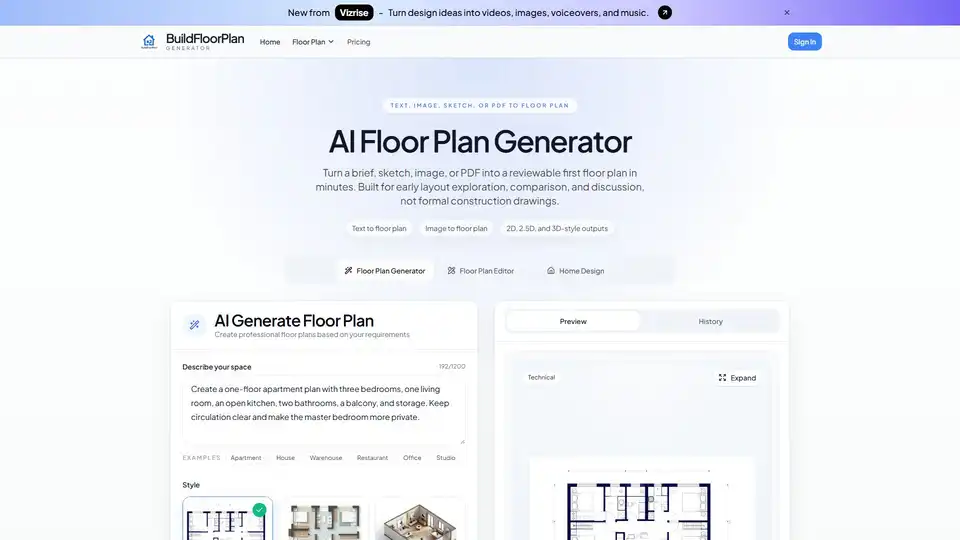
Overview of BuildFloorPlan
What is BuildFloorPlan? The Revolutionary AI Floor Plan Generator
In the dynamic world of architecture, interior design, and real estate, the ability to quickly visualize and iterate on spatial concepts is paramount. BuildFloorPlan emerges as an innovative AI floor plan generator, designed to streamline the initial stages of design and planning. This powerful online tool harnesses artificial intelligence to transform diverse inputs—from simple text descriptions and hand-drawn sketches to images and existing PDF plans—into clear, reviewable floor plans within minutes. Unlike traditional methods that often demand extensive manual drafting and specialized software, BuildFloorPlan offers a rapid, intuitive pathway to translate nascent ideas into tangible, discussable layouts.
BuildFloorPlan is specifically engineered to accelerate early layout exploration, comparison, and discussion, serving as a vital bridge between abstract concepts and detailed design work. It's important to note that while it provides highly functional and visually appealing plans, it is not intended for generating formal construction drawings or final technical documentation. Instead, its strength lies in facilitating efficient ideation, feedback loops, and stakeholder alignment before significant time, money, or resources are committed to deeper design processes.
Key Features of BuildFloorPlan: Bridging Ideas to Visual Layouts
BuildFloorPlan stands out with a suite of features meticulously crafted for design efficiency and clarity:
Versatile Input Options:
- Text to Floor Plan: Begin with a simple textual brief, describing your spatial requirements, room count, layout goals, and practical constraints. BuildFloorPlan intelligently interprets these descriptions to generate a foundational layout. This is particularly useful when you have a clear vision of the space's function but want to bypass the initial drafting phase.
- Image to Floor Plan: Upload existing images of layouts, sketches, or even photographs of hand-drawn plans. The AI analyzes the visual input and refines it into a cleaner, more professional digital floor plan.
- Sketch to Floor Plan: Convert rough, conceptual sketches directly into structured floor plans. This feature is invaluable for designers who prefer to brainstorm ideas on paper but need a quick digital rendition for review.
- PDF to Floor Plan: Transform existing PDF floor plans into editable and reviewable formats. This is perfect for renovating an existing space or updating an older design without rebuilding from scratch.
Diverse Output Styles for Every Need: BuildFloorPlan offers three distinct output styles, each serving a specific purpose in the design and review process:
- Technical 2D: A classic, readable floor plan ideal for early planning, internal feedback, and iterative revisions. It provides a clear, top-down view with essential architectural elements.
- 2.5D Plan: A more visually enhanced version featuring wall thickness and room hierarchy, presented from a top-down perspective. This style is excellent for presentations, family discussions, or initial client reviews, offering a better sense of depth than a pure 2D plan.
- 3D Isometric: Provides a quick spatial view, helping users understand room flow, furniture placement, and overall spatial dynamics in a pseudo-3D environment. This output is crucial for making informed decisions about the spatial feel before diving into heavier 3D modeling workflows.
Integrated Floor Plan Editor (via upload): For those who start with an existing source plan, BuildFloorPlan allows for an "editor workflow" to generate a cleaner, first-pass version without needing to start completely from zero, facilitating faster visual revisions.
How Does BuildFloorPlan Work? A Simple Workflow for Rapid Prototyping
The process of generating a floor plan with BuildFloorPlan is designed for simplicity and speed, making design accessible to professionals and novices alike.
01. Enter What You Know: The journey begins by providing BuildFloorPlan with your initial input.
- If you have a clear idea of the requirements, simply type out a prompt detailing the room count, desired layout goals (e.g., open concept living, separate study), and any basic constraints (e.g., specific dimensions, number of bathrooms). The more specific you are, the better the AI can interpret your vision.
- Alternatively, if you already have a foundational layout, upload an image, a hand-drawn sketch, or a PDF document. BuildFloorPlan's advanced AI algorithms will then analyze these visual inputs to extract the core structural and spatial information. The key here is to keep the input practical and focused, whether it’s a detailed text prompt or a clear visual reference.
02. Generate a First Layout: Once your input is provided, BuildFloorPlan springs into action. Leveraging sophisticated AI models trained on vast architectural datasets, it swiftly transforms your rough input into a reviewable floor plan concept. You can select your preferred output style—Technical 2D for clarity, 2.5D for enhanced visualization, or 3D Isometric for spatial understanding—and the tool will render a plan tailored to your choice. This step is engineered for fast first drafts, prioritizing quick comparison and iteration over long setup times.
03. Review and Move Forward: The generated layout serves as a concrete starting point. You can now use this first-pass plan to:
- Compare Options: Easily generate multiple variations by tweaking your input or trying different styles, allowing for side-by-side comparison of design directions.
- Explain the Space: The visual clarity of the generated plans makes it significantly easier to communicate complex spatial ideas to clients, family members, or team stakeholders.
- Facilitate Discussions: By providing a tangible representation, BuildFloorPlan helps move conversations forward, making feedback more constructive and decisions more informed, setting a stronger foundation for subsequent revisions and deeper design work.
Who is BuildFloorPlan For? Empowering Diverse User Groups
BuildFloorPlan is a versatile AI tool that caters to a broad spectrum of users, each benefiting from its ability to rapidly generate and visualize floor plans.
For Homeowners: Considering a renovation, planning a move, or simply redesigning your existing space? BuildFloorPlan empowers you to explore countless layout directions effortlessly. Instead of struggling with complex software or abstract ideas, homeowners can quickly generate and compare different floor plan concepts. This allows for informed decisions about potential layouts before committing significant time, money, or emotional investment into a deeper design process or construction. Visualize furniture placement, room flow, and overall functionality with ease.
For Interior Designers: In a profession where efficiency and client communication are critical, BuildFloorPlan is an indispensable asset. Designers can transform initial notes, client briefs, and reference images into rapid first-draft concepts. This eliminates the arduous task of drafting every early option from scratch, freeing up valuable time to focus on creative refinement and client engagement. BuildFloorPlan helps designers present clearer starting points for client review, ensuring early alignment and minimizing costly revisions down the line.
For Small Teams (Architecture, Real Estate, Development): Collaboration is key in team environments, and BuildFloorPlan facilitates this by providing a fast concept layer. Teams can quickly generate clear layout directions for internal reviews, approvals, and presentations. It serves as an agile tool for aligning team members on spatial concepts, moving discussions forward with tangible visuals before diving into deeper technical work or final documentation. This ensures that everyone is on the same page from the outset, streamlining project workflows and accelerating decision-making.
Practical Value and Benefits: Why Choose BuildFloorPlan?
BuildFloorPlan delivers substantial practical value, fundamentally changing how initial floor plan generation is approached.
- Accelerated Ideation and Exploration: The most significant benefit is the speed at which ideas can be visualized. What once took hours or days of manual drafting can now be achieved in minutes, allowing for more extensive exploration of design possibilities. This rapid prototyping capability fosters creativity and innovation.
- Enhanced Communication: Visuals speak louder than words. BuildFloorPlan provides clear, reviewable layouts that simplify complex spatial discussions, making it easier for clients, stakeholders, and team members to understand and provide feedback on design concepts. The various output styles cater to different communication needs, from technical clarity to persuasive presentations.
- Cost and Time Efficiency: By front-loading the design process with AI-generated first drafts, users can significantly reduce the time and cost associated with manual drafting, revisions, and potential rework. Early identification of issues or preferences through clear visuals prevents costly changes later in the project lifecycle.
- Lower Barrier to Entry: For individuals without extensive CAD software experience, BuildFloorPlan democratizes floor plan creation. Its intuitive interface and AI-driven process make professional-looking layouts accessible to a broader audience, from DIY homeowners to aspiring designers.
- Improved Decision-Making: By offering quick comparisons of different layout options, BuildFloorPlan empowers users to make more informed decisions. Understanding the spatial implications of various designs early on leads to better outcomes and greater satisfaction with the final product.
Common Questions About BuildFloorPlan (FAQ)
To further clarify the utility and functionality of BuildFloorPlan, here are answers to some frequently asked questions:
Is BuildFloorPlan free to try? Yes, BuildFloorPlan offers a free trial. Upon creating a free account, users are typically granted 2 free generations to test the workflow and experience the tool's capabilities firsthand before considering a paid plan.
Is BuildFloorPlan designed for formal construction drawings? No, BuildFloorPlan is explicitly designed for concept exploration, first drafts, and early layout discussion. It is not intended to produce formal construction documents, which require highly detailed, dimensioned, and legally compliant drawings typically created by licensed architects and engineers using specialized CAD software. Its purpose is to provide a strong, reviewable starting point for such deeper design work.
Can I start a floor plan from text, an image, or a PDF? Absolutely. BuildFloorPlan supports multiple input methods. You can begin by describing your requirements in a short text prompt, or upload an existing image, sketch, or PDF if you have a source plan you wish to refine or transform. This flexibility ensures that users can start from whatever preliminary information they possess.
What does one run give me? Each generation run provides you with one reviewable floor plan. You can select your preferred output style for this plan—be it Technical 2D, 2.5D, or 3D Isometric—allowing you to tailor the output to your specific review or presentation needs.
Can I edit an existing floor plan instead of starting from scratch? Yes, this is a core capability. If you have an existing source plan (e.g., an old blueprint scan, a hand-drawn sketch), you can upload it. BuildFloorPlan's editor workflow then enables you to generate a cleaner, AI-enhanced version of that plan, making it easier to revise and work with without rebuilding everything from the ground up.
Who is BuildFloorPlan best for? BuildFloorPlan is optimally suited for homeowners who are exploring different layout options for their living spaces, interior designers aiming to create faster first drafts and streamline client presentations, and small teams in architecture, real estate, or development that require clearer visuals for early-stage conceptualization and internal alignment.
Best Way to Get Started with BuildFloorPlan
The best way to leverage BuildFloorPlan is to integrate it early in your design process. Use it as a rapid ideation engine when moving from a vague idea to a clear concept. If you're a homeowner, experiment with different room arrangements. If you're a designer, quickly turn client notes into initial concepts. By starting with BuildFloorPlan, you gain a significant head start, allowing you to review, compare, and discuss layouts before the initial momentum of a project is lost. The tool empowers you to transform rough inputs into something immediately reviewable, making subsequent design conversations easier and more productive.
To begin your floor plan journey, simply open the generator, describe your space, and witness how BuildFloorPlan helps you arrive at a stronger first layout efficiently.
Tags Related to BuildFloorPlan
