
ChatGPT Watermark Remover
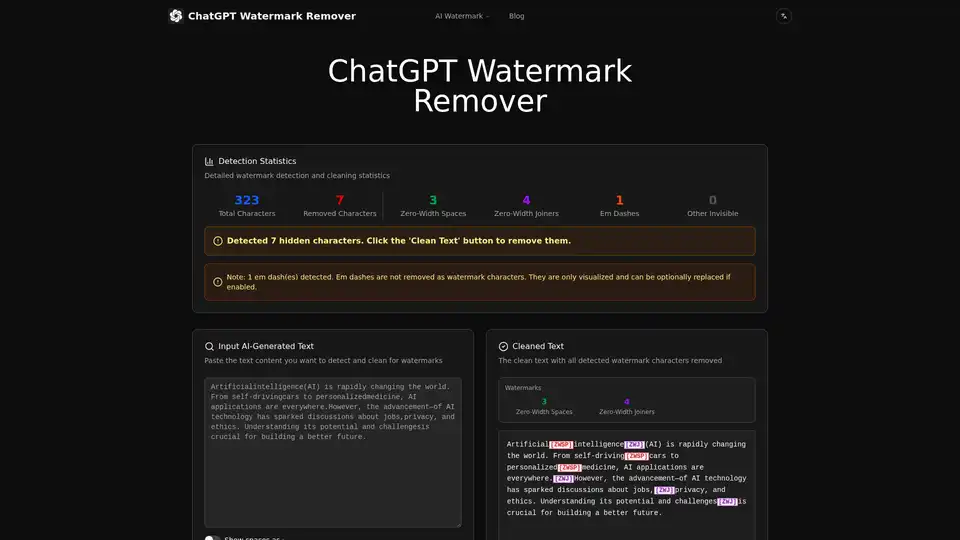
Overview of ChatGPT Watermark Remover
What is ChatGPT Watermark Remover?
The ChatGPT Watermark Remover is a sophisticated, free online tool designed to cleanse AI-generated text of invisible watermarks. Developed to address the growing need for content privacy and authenticity, this tool operates entirely within your browser. It eliminates hidden Unicode characters—often used by platforms like ChatGPT and Claude to track or identify AI-generated content—ensuring your text remains clean and untraceable. Unlike cloud-based solutions that require data uploads, this tool guarantees 100% privacy by processing everything locally on your device, making it a secure choice for writers, students, and professionals handling sensitive or proprietary information.
How Does the ChatGPT Watermark Remover Work?
The tool leverages advanced client-side algorithms to perform real-time analysis and cleaning of your text. When you paste AI-generated content into the input box, the system automatically scans for over 30 types of invisible Unicode characters. These include:
- Zero-Width Spaces (ZWSP, U+200B): Invisibly inserted between words to mark AI text.
- Zero-Width Joiners (ZWJ, U+200D): Used to join characters, often as a steganographic marker.
- Other Invisibles: Such as Word Joiners (U+2060), Non-Breaking Spaces (U+00A0), and specific line or paragraph separators.
The process is instantaneous and occurs without any external server calls. After detection, the tool provides detailed statistics on the cleaned characters and visualizes them using color-coded badges, allowing users to see exactly what was removed. This transparency, combined with its offline capability, makes it a robust solution for ensuring content is watermark-free.
Key Features of the Tool
The ChatGPT Watermark Remover offers a comprehensive suite of features tailored for privacy and usability:
- Advanced Detection Engine: Identifies and classifies a wide array of invisible characters, including zero-width spaces, joiners, and formatting controls.
- Instant Visualization: Users can click "Visualize Characters" to see all hidden markers highlighted, providing clarity on what needs to be cleaned.
- Real-Time Statistics: Displays counts of total characters, removed characters, and specific types of watermarks detected (e.g., 3 Zero-Width Spaces, 4 Zero-Width Joiners).
- 100% Privacy-Focused: All processing is done in the browser; no data is sent to any server, ensuring complete confidentiality.
- Offline Ready: Once the page loads, the tool functions without an internet connection, ideal for secure environments.
- Multi-Platform Compatibility: Works effectively with content from ChatGPT, Claude, and other major AI language models.
- User-Friendly Interface: Simple four-step process: paste text, visualize, configure options, and clean.
Who Is This Tool For?
This tool is designed for a diverse range of users who interact with AI-generated content:
- Content Creators & Writers: Professionals who use AI for drafting but need to remove traces before publication to avoid SEO penalties or plagiarism concerns.
- Academics & Students: Individuals submitting papers or reports who must ensure their work is purely human-authored and free from AI detection markers.
- Business Professionals: Those handling internal communications, reports, or marketing copy where privacy and authenticity are paramount.
- Developers & Researchers: Users analyzing AI model outputs or working on projects requiring clean, unmarked text data.
Why Choose This AI Watermark Remover?
Choosing the right tool for text sanitation is critical for maintaining content integrity. Here’s why this solution stands out:
- Unmatched Privacy: In an era of data breaches, local processing ensures your sensitive information never leaves your control.
- Speed and Efficiency: Real-time operation means no waiting for server responses—clean text in seconds.
- Accuracy and Depth: It doesn’t just remove spaces; it targets a comprehensive list of Unicode invisible characters used in modern AI watermarking schemes.
- No Cost, No Ads: The tool is entirely free to use, with no hidden fees or intrusive advertising, focusing solely on delivering value.
How to Use the ChatGPT Watermark Remover: A Step-by-Step Guide
Using the tool is straightforward. Follow these steps to ensure your text is clean:
- Paste Your Text: Copy the AI-generated text from your source (e.g., ChatGPT, Claude, or other LLMs) and paste it into the input box on the tool's homepage.
- Visualize Hidden Characters: Click the "Visualize Characters" button. The tool will display your text with hidden characters highlighted (e.g., with colored badges or different symbols). This step helps you understand what exactly is present in your text.
- Configure Cleaning Options: Adjust the settings based on your needs. You can toggle options to show spaces/tabs as symbols or enable handling for specific dash characters like em dashes (—). Note that em dashes are visualized but not automatically removed as they are not typically watermark characters.
- Clean Your Text: Click the "Clean Text" button. The tool will instantly remove all detected invisible watermark characters and display a cleaned version in the output area.
- Copy the Cleaned Text: Once satisfied, click the "Copy" button to transfer the watermark-free text to your clipboard, ready for use in any application.
What Types of Watermarks Can It Detect?
The tool is engineered to detect a broad spectrum of invisible Unicode characters commonly used in AI text watermarking. Here’s a breakdown of the primary types it identifies:
| Character Type | Unicode | Description | Use in AI Text |
|---|---|---|---|
| Zero-Width Space (ZWSP) | U+200B | Invisible character with zero width, often inserted between words. | Common watermark for tracking AI-generated content. |
| Zero-Width Joiner (ZWJ) | U+200D | Joins adjacent characters, used in complex scripts. | Serves as a steganographic marker in AI text. |
| Zero-Width Non-Joiner (ZWNJ) | U+200C | Prevents joining of adjacent characters. | Used as a hidden marker for detection. |
| Word Joiner (WJ) | U+2060 | Prevents line breaks between words. | Potential fingerprinting mechanism. |
| Non-Breaking Space (NBSP) | U+00A0 | Prevents automatic line breaks. | Occasionally used for content tracking. |
| Em Dash (—) | U+2014 | Long punctuation dash. | Visualized but not removed (not a watermark). |
Privacy and Security: Client-Side Processing
Privacy is the cornerstone of this tool. Unlike many online utilities that require uploading your text to a server for processing, the ChatGPT Watermark Remover operates entirely in your web browser using JavaScript. This approach means:
- No Server Uploads: Your text never leaves your device.
- No Data Retention: There is no backend database storing your content.
- Enhanced Security: Ideal for proprietary, confidential, or sensitive information.
This client-side model ensures that even in high-security environments, you can clean text without network exposure.
Common Use Cases and Applications
The utility of this tool extends across various scenarios:
- Preparing Drafts for Publication: Bloggers and journalists can clean AI-assisted drafts before submitting to editors or publishing on platforms that may penalize AI content.
- Academic Integrity: Students and researchers can verify and cleanse their work, ensuring submissions are free from AI signatures that could violate academic policies.
- Marketing and SEO: SEO specialists and marketers can refine AI-generated copy to avoid duplicate content flags and ensure originality.
- Software Testing: Developers can use the tool to generate clean test data or analyze outputs from AI APIs.
Frequently Asked Questions (FAQs)
Q: How accurate is the detection? A: The tool uses precise Unicode parsing and is highly accurate at detecting standard invisible characters. However, extremely complex or custom watermarks may not be caught; for such cases, manual inspection of the visualization is recommended.
Q: Does it work with all languages? A: Yes, the tool is language-agnostic. It processes the underlying Unicode characters regardless of the language (English, Spanish, Chinese, etc.), though the visualization is most effective with Latin-based scripts.
Q: Is there a limit on text length? A: While there is no strict server-imposed limit (since processing is local), extremely large texts (e.g., entire books) might cause performance issues in some browsers. It is optimized for typical document lengths (up to several thousand words).
Q: Can I use this tool for commercial purposes? A: Yes, the tool is free for both personal and commercial use. You are encouraged to use it for any project requiring watermark-free text.
Expert Tips for Best Results
- Always visualize first: Use the "Visualize Characters" feature to understand the nature of watermarks before cleaning.
- Check the statistics: Review the counts of detected characters to gauge how heavily your text was watermarked.
- Combine with manual review: For critical documents, clean the text and then perform a manual read-through to ensure no artifacts remain.
- Use offline mode: Once the page is loaded, you can disconnect from the internet and still use the tool, providing an extra layer of privacy.
In summary, the ChatGPT Watermark Remover is an essential, privacy-first tool for anyone working with AI-generated content. Its combination of comprehensive detection, local processing, and user-friendly design makes it a reliable choice for maintaining text authenticity and security in the digital age.
Best Alternative Tools to "ChatGPT Watermark Remover"

Tags Related to ChatGPT Watermark Remover