
Flux 2
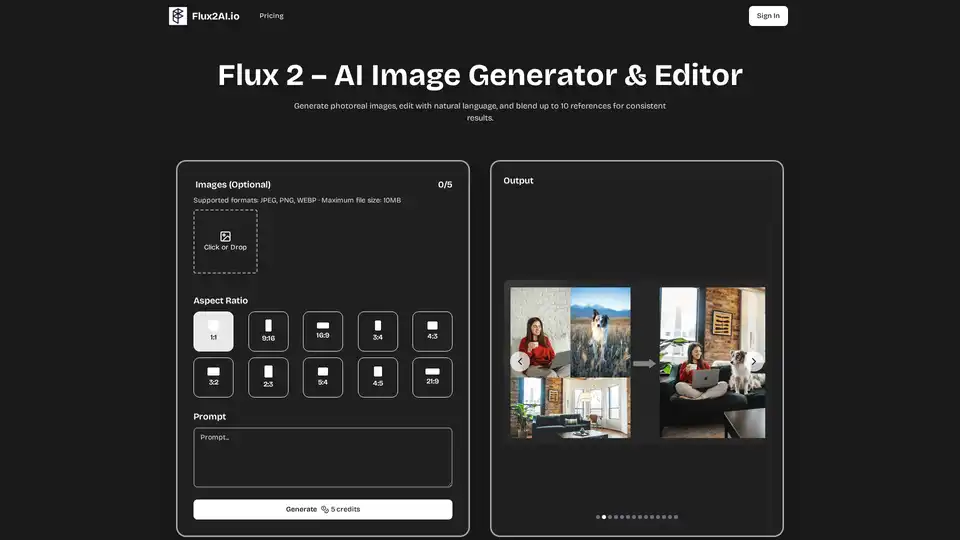
Overview of Flux 2
What is Flux 2?
Flux 2 is Black Forest Labs’ next-generation AI image engine. It allows users to generate photorealistic visuals, refine details with plain-language edits, and merge up to ten reference images for perfectly consistent style across campaigns. It keeps your original composition but applies the exact style or changes you describe—putting full creative control in your hands.
How does Flux 2 work?
Flux 2 leverages advanced vision models for lifelike output and effortless edits. The key features that make Flux 2 fast and flexible include:
- Crisp Details: Advanced super-resolution pipeline preserves micro-textures, edge definition and true-to-life color accuracy at any output size. Advanced AI denoising also removes compression artifacts without softening important edges.
- Versatile Styles: Instantly shift the mood of any photo by adjusting warmth, saturation or stylistic presets. Toggle from cinematic teal-and-orange to soft pastel or bold monochrome in seconds. Preset bundles cover fashion, product, landscape and concept-art, speeding up experimentation.
- Realistic Poses: Pose-aware depth estimation blends subjects into new scenes with convincing shadows and perspective. Depth-guided masks respect clothing folds and hair strands for truly natural integration.
- Live Adjustments: Interactive sliders for brightness, blur and color temperature let you see changes update in real-time.
- Simple Download: Export creations in the optimal format for social posts, web or high-resolution print. Color profiles are embedded automatically, ensuring accuracy across devices, and naming templates keep your assets organized. Batch export multiple ratios at once to streamline cross-platform publishing workflows.
- Cloud Rendering: All processing happens on Flux 2’s secure cloud infrastructure—no heavy installs or GPU required.
How to use Flux 2?
Follow these three quick steps to turn any photo into something new:
- Upload Your Photo: Pick a clear, well-lit picture to kick things off.
- Describe Your Edits: Explain the style, colors, or changes you’d like to see.
- Generate & Save: Preview, adjust, then keep the high-quality result.
Why choose Flux 2?
Flux 2 offers several benefits for creators:
- Keeps Scene Structure: Key subjects stay perfectly placed while the rest of the picture evolves as you wish.
- Rapid Style Swaps: Flip between moods or looks in seconds—ideal for speedy concepts and prototyping.
- Precise Adjustments: Fine-tune strength, aspect ratio, and output quantity until it fits your vision.
- Rich Detail: Balances texture, light and background for a polished finish.
- Scene-Smart Layout:
- Uniform Atmosphere:
Who is Flux 2 for?
Flux 2 is suitable for artists, marketers, and hobbyists looking for fresh creative power. Here are some examples of how creators are using Flux 2:
- Virtual Outfit Preview: Preview new fabrics, cuts and colors on mirror selfies without needing a fitting room.
- Product Scene Swap: Place a product image into themed scenes ready for campaigns without pricey sets or lighting rigs.
User Voices
- Brian K.: I mock-up product photos before reserving a studio—Flux 2 saves me thousands every launch.
- Maya L.: As a solo marketer I produce campaign graphics in minutes—no more hunting for stock images.
- Leo P.: The concept-art presets let me iterate game assets quickly—the art team loves the jump-start.
- Sofia G.: I turn client sketches into refined interior renders—feedback sessions are a breeze.
- James W.: One prompt unlocks endless social posts. Engagement grew 4× after dropping stock graphics.
Best way to refine AI images?
Flux 2 offers interactive sliders for brightness, blur and color temperature let you see changes update in real-time. You can also mix themes, colors, and backgrounds or add custom references to lock in character consistency. Clear onboarding tips walk first-time users from upload to final image in under two minutes, while advanced sliders let pros fine-tune strength, aspect ratio, and batch size for production workflows.
Flux 2 – AI Image FAQ
What is Flux 2?
Flux 2 is Black Forest Labs’ next-generation AI image suite that instantly turns text prompts and reference photos into realistic images.
Why choose Flux 2?
Skip hours of manual editing—write exactly what you want, preview ideas instantly, and keep brand colors consistent without tedious masking layers. Flux 2’s cloud renderer delivers pixel-perfect drafts in seconds, freeing you to focus on creativity instead of repetitive retouching.
How do I start using Flux 2?
Create an account, upload or describe your idea, and hit generate. Clear onboarding tips walk first-time users from upload to final image in under two minutes, while advanced sliders let pros fine-tune strength, aspect ratio, and batch size for production workflows.
Where can I learn more?
Our blog hosts detailed guides, tips, and advanced tutorials on multi-prompt blending, noise scheduling, and color management so you can push creative boundaries with confidence. New articles every week showcase expert workflows and behind-the-scenes model updates.
What makes Flux 2 different?
Perspective-aware alignment plus adaptive tone-mapping preserves depth cues, shadows, and highlights while letting your chosen style shine. The result is natural yet imaginative imagery that feels camera-ready without artifacts or strange proportions.
Can I adjust the visual style?
Absolutely—mix themes, colors, and backgrounds or add custom references to lock in character consistency. Interactive sliders let you fine-tune grain, color levels, and lighting temperature for precision control, whether you are producing social content or high-res print shots.
Tags Related to Flux 2
