
Image to Video AI
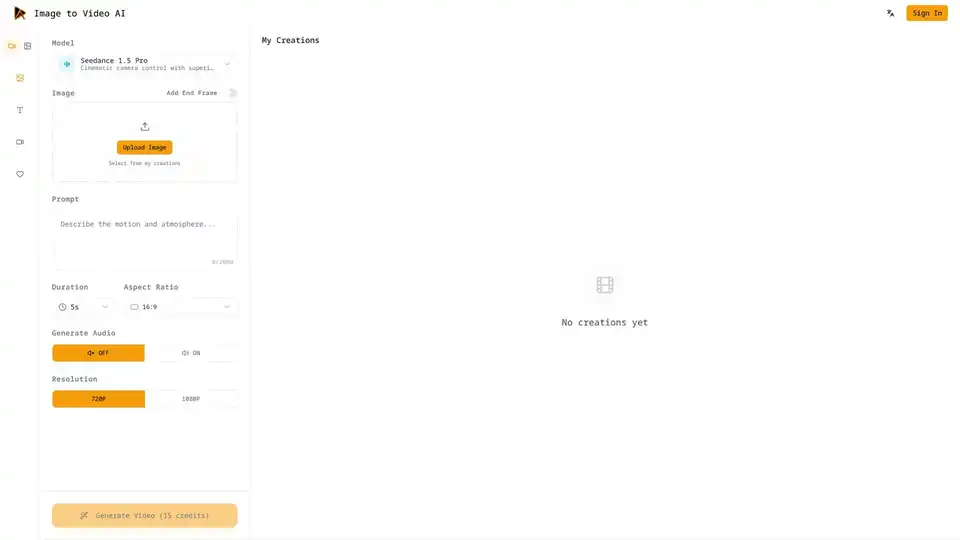
Overview of Image to Video AI
What is Image to Video AI?
Image to Video AI is a cutting-edge platform designed to transform static images into dynamic, story-driven video clips using advanced artificial intelligence. Whether you are a marketer looking to create engaging product demos, a filmmaker testing concept art, or a content creator aiming to refresh social media posts, this tool provides a seamless workflow to bring still visuals to life. By leveraging models like Seedance 1.5 Pro, Image to Video AI delivers superior dynamic motion, cinematic camera control, and optional voiceover capabilities without requiring any professional video editing skills.
The platform stands out by offering a comprehensive studio environment where users can compare motion quality, speed, and style across different AI models in seconds. This flexibility allows creators to switch models without reuploading assets, ensuring that prompts and settings remain consistent for easy benchmarking. With features like native cinematic sound effects, keyframe control, and consistency safeguards, Image to Video AI ensures that every clip feels intentional and polished.
Key Features of Image to Video AI
Cinematic Camera Control and Dynamic Motion
One of the core strengths of Image to Video AI is its ability to generate natural motion and realistic physics. Unlike simple pan-and-zoom tools, this platform understands the weight and momentum of objects within an image. It balances character consistency, physics compliance, and motion magnitude to ensure complex scenes stay coherent. The cinematic camera control allows users to dictate how the virtual camera moves, creating a professional look that rivals traditional video production.
Start and End Frame Control
Precision is crucial for storytelling. Image to Video AI lets you lock the first and last frame of your generated clip. This feature ensures that transitions stay faithful to your storyboard, making it ideal for product turnarounds, before/after cuts, or precise keyframe shots. By controlling the start and end points, users can maintain narrative continuity and avoid unexpected visual jumps.
Multi-Image Reference Support
To maintain visual continuity across a sequence, the tool supports multiple reference images. You can provide cues for style, wardrobe, and environment, and the AI blends these inputs to keep consistency while you iterate fast. This is particularly useful for creating series of clips where character identity or brand aesthetics must remain stable.
Native Cinematic Sound and Voiceover
Audio is half the experience. Image to Video AI adds native cinematic sound effects and ambience that sync with motion, so every clip feels film-ready without separate audio editing or stock libraries. Additionally, the optional voiceover feature allows you to narrate your clips directly within the platform, streamlining the production process.
Seamless Integrations
Workflow efficiency is paramount. Image to Video AI is integrated with Google Chrome, Google Workspace, and Figma. You can launch the tool where your files already live, work from Drive, or generate motion previews from Figma designs. Outputs can be saved directly to Google Drive with shared permissions, keeping feedback and versions in one place.
How Does Image to Video AI Work?
Creating videos with Image to Video AI is a straightforward four-step process designed for speed and ease of use.
- Choose the Right Model: Select a model based on your needs for realism, stylization, or speed. You can preview expected motion before rendering. The platform remembers your selections, ensuring consistency across repeat projects.
- Upload or Pick Assets: Upload a photo, illustration, or product shot, or select from your saved asset library. The tool preserves framing and resolution, reducing the need for re-cropping.
- Write a Prompt and Set Parameters: Describe the desired camera movement, lighting, and mood. Tune duration (e.g., 5s) and aspect ratio (e.g., 16:9) to match your target platform.
- Generate and Preview: Render a draft, review timing and voiceover, and generate variations for fast iteration. Each version is organized for easy comparison and approval.
Use Cases for Image to Video AI
E-commerce and Commercial Ads
Marketers can turn product stills into motion spots that highlight materials, features, and scale. Image to Video AI lets you test multiple angles, backgrounds, and hooks quickly, then pick the highest-performing version for campaigns. This reduces the cost and time associated with traditional video shoots.
Film and Game Preproduction
Animation teams can animate concept art into moving boards, camera tests, or mood reels before full CG work begins. This helps explore pacing, lens choices, and scene transitions while keeping budget risk low. It serves as a powerful visualization tool for directors and producers.
Social Media and Content Creation
Refresh static posts with motion, text overlays, and subtle camera movement that stops the scroll. Content creators can produce daily variations with consistent style across platforms, enhancing engagement rates without needing a full production crew.
Virtual Humans and AI Characters
Bring portraits and character sheets to life for demos, onboarding, or interactive prototypes. The tool maintains identity while adding expression, breathing, and micro-motion for realism, making it ideal for VTubers or digital influencers.
Education and Enterprise Content
Convert diagrams, product visuals, or slide images into short explainer clips that make ideas easier to grasp. Teams can communicate changes, outcomes, and workflows faster, improving internal and external communication.
Why Choose Image to Video AI?
What are the key benefits? The platform combines narration, keyframe control, cinematic camera language, and consistency safeguards in one workflow. It is built for fast iteration, clear controls, and shareable results. Unlike competitors, it offers deep integrations with tools you already use, such as Figma and Google Workspace.
Who is Image to Video AI for? It is designed for marketers, filmmakers, content creators, educators, and enterprise teams who need high-quality video content without the high cost of production. Whether you are creating ads, previsualizing scenes, or enhancing social media presence, this tool provides the necessary capabilities.
FAQ
What image formats and resolutions work best? The platform supports common image formats and allows resolution settings up to 1080P. For best results, use high-quality source images.
How long can each video be? Standard duration settings include options like 5 seconds, suitable for social media clips and ads.
Can I control style, camera, and motion intensity? Yes, through prompts and parameter settings, you have significant control over camera movement, lighting, and mood.
Is Image to Video AI free to use? The platform offers a free start option, allowing users to create their first clips without immediate cost. Credit systems apply for generation (e.g., 15 credits per video).
Is my data safe here? The platform prioritizes data safety, ensuring your uploads and creations are secure. Refer to the Privacy Policy for detailed information.
Conclusion
Image to Video AI represents a significant leap forward in generative video technology. By turning ideas into cinematic visuals from simple prompts, it gives creators and teams a fast, reliable way to bring stories to life and share them everywhere. With its robust feature set, including frame control, audio integration, and workflow connectivity, it is an essential tool for modern digital content creation. Start free today and experience the power of AI-driven video generation.
Tags Related to Image to Video AI
