
Marqraft Lyra
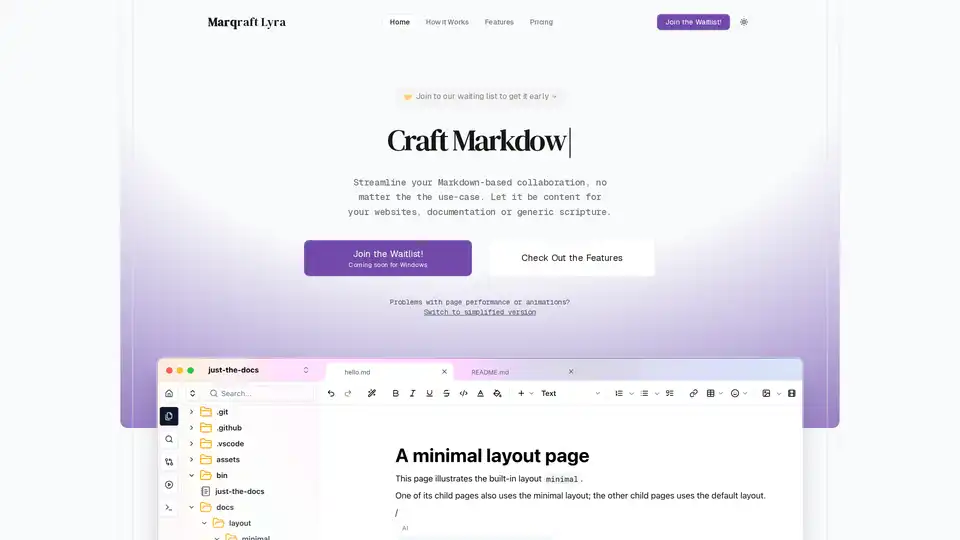
Overview of Marqraft Lyra
What is Marqraft Lyra?
Marqraft Lyra is an innovative, AI-powered Markdown editor designed to revolutionize how writers, developers, and content creators handle Markdown-based projects. Currently in development and available via a waitlist for early access, Lyra promises a free desktop application compatible with Windows, Mac, and Linux. It stands out by combining intuitive block-based editing, real-time AI collaboration, and full offline functionality, eliminating the need for cloud dependencies. Whether you're crafting website content, technical documentation, or personal notes, Marqraft Lyra streamlines the process, making Markdown writing effortless and productive.
In a world where Markdown has become the gold standard for lightweight, readable documentation—used by platforms like GitHub, Reddit, and countless blogs—tools like Lyra address common pain points. Traditional editors often lack smart assistance or force users into rigid text flows. Lyra changes that with AI integration that feels natural, helping users overcome writer's block and syntax hurdles.
Key Features of Marqraft Lyra
Marqraft Lyra packs a suite of features tailored for modern workflows:
- Real-time AI Collaboration: Partner with an built-in AI assistant for instant suggestions, rephrasing, and idea generation. Never stare at a blank page again—get actionable insights to enhance your content on the fly.
- Intelligent Command Palette: Forget memorizing Markdown syntax. Simply summon the command palette to insert snippets, headers, lists, or code blocks with a few keystrokes.
- Powerful Block-based Editing: Treat documents as modular structures. Easily move, reorder, copy, or delete blocks, preserving context and meaning—ideal for complex docs.
- Seamless Integrations: Connect with tools like GitHub or GitLab for version control, boosting team productivity without vendor lock-in.
- Offline-First Design: Works entirely locally, no internet required. Perfect for travelers or secure environments.
- Built-in Preview and Project-based Editing: Real-time previews ensure your output looks perfect, while project organization keeps everything tidy.
- Cross-Platform Support: Native apps for Windows, Mac, and Linux mean consistent experience anywhere.
- Security by Design: Leverages your device's encryption and trusted services—no new accounts or data sharing.
These features make Lyra scalable from solo writers to teams, supporting commercial use without restrictions.
How Does Marqraft Lyra Work?
Lyra's workflow is straightforward and user-friendly, broken into four intuitive steps:
- Phrase and Rephrase: Start writing with AI help to refine ideas.
- Edit, Build, Preview: Use blocks and commands to structure content, preview instantly.
- Offline Editing: Everything stays local for speed and privacy.
- Integrate and Share: Sync with Git repos or export as needed.
Powered by advanced AI models, the assistant analyzes your context to suggest improvements, much like having a co-writer. For instance, highlight text for rephrasing, or query the palette for 'insert table'—it handles the syntax automatically. This AI Markdown editing approach reduces errors and speeds up iteration, especially for non-experts diving into technical writing.
How to Use Marqraft Lyra?
Once released (join the waitlist at the official site), download the desktop app:
- Install on your OS of choice.
- Create or open a project folder.
- Dive into block editing with AI palette at hand.
- Preview, integrate, and export.
No steep learning curve—its design prioritizes familiarity for Markdown veterans while onboarding newcomers via AI guidance.
Pro Tip: For teams, set up Git integration from day one to enable collaborative versioning without real-time syncing hassles.
Why Choose Marqraft Lyra Over Other Markdown Editors?
Compared to tools like Obsidian, Typora, or VS Code extensions, Lyra excels in AI-native features and zero-cost model:
| Feature | Marqraft Lyra | Obsidian | Typora | VS Code |
|---|---|---|---|---|
| AI Assistant | ✅ Real-time | Plugins only | No | Extensions needed |
| Block Editing | ✅ Native | ✅ | Limited | Plugins |
| Offline | ✅ Full | ✅ | ✅ | ✅ |
| Free Forever | ✅ $0/mo | ✅ | Paid | Free (ext) |
| Cross-Platform | ✅ All desktops | ✅ | ✅ | ✅ |
It's free with no hidden fees, focusing on core value. Developers praise similar tools for cutting editing time by 40-50%, and Lyra's AI could amplify that for documentation-heavy projects.
Who is Marqraft Lyra For?
- Content Creators: Bloggers and website authors needing fast, polished Markdown.
- Developers & Docs Writers: For READMEs, API docs, or internal wikis.
- Teams & Collaborators: Remote groups using Git for version control.
- Students & Researchers: Offline note-taking with AI summaries.
- Anyone Tired of Syntax Fumbles: Beginners to pros seeking productivity boosts.
Ideal for AI-assisted writing in documentation workflows, where structure matters as much as text.
Practical Value and Use Cases
Lyra shines in real-world scenarios:
- Technical Documentation: Build structured guides with blocks and AI for clarity.
- Website Content: Phrase SEO-friendly posts with rephrasing tools.
- Personal Knowledge Bases: Offline journaling with previews.
- Team Onboarding: Scalable for growing teams via integrations.
Early adopters can expect user testimonials highlighting time savings—imagine drafting a full doc in half the time. As Markdown powers 80% of open-source repos, Lyra positions itself as an essential free AI Markdown tool.
Pricing and Availability
Free Forever: $0/month includes all features—no upsells. Join the waitlist with your email for beta access and updates.
FAQ Highlights
- Commercial Use? Yes.
- Secure? Local-first, uses trusted device security.
- Open Source? TBD—watch for updates.
- Integrations? GitHub, GitLab, etc.
Marqraft Lyra isn't just an editor; it's a smart writing companion empowering productivity. Sign up today and elevate your Markdown game!
Tags Related to Marqraft Lyra
