
OutfitSwap Studio
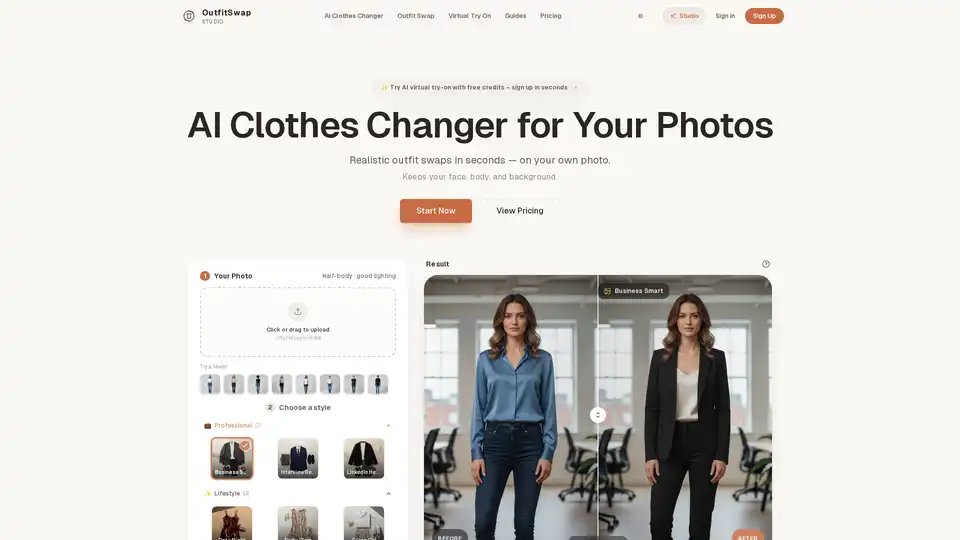
Overview of OutfitSwap Studio
What is OutfitSwap Studio?
OutfitSwap Studio is a cutting-edge AI clothes changer and virtual try-on platform designed to transform how users visualize and experiment with clothing. Unlike generic AI image generators that create entirely new images from scratch, OutfitSwap Studio focuses specifically on realistic AI outfit swaps for your existing photos. It uses advanced generative AI technology to change the clothes on a portrait or half-body photo while meticulously preserving the user's original face, body proportions, and background. This makes it an ideal tool for anyone looking to test wardrobe ideas, create professional visuals, or simply explore fashion without the need for physical try-ons.
How Does OutfitSwap Studio Work?
The core principle behind OutfitSwap Studio is AI-powered image synthesis. The platform employs sophisticated AI models that have been trained to understand human anatomy, fabric drape, lighting, and background contexts. When a user uploads a photo, the AI analyzes the image to identify the existing outfit, the person's pose, and the surrounding environment. It then applies a selected curated preset style—which is essentially a pre-optimized text prompt embedded within the style—by digitally removing the old clothes and rendering new ones onto the body. The key is that the AI maintains the identity of the person, ensuring that the facial features, skin tone, and body shape remain consistent, thereby producing a highly realistic and convincing visual.
Core Features of OutfitSwap Studio
- Realistic Outfit Swaps: The primary feature is the ability to swap outfits with high fidelity. The AI doesn't just paste a pattern; it realistically simulates how fabric would fall, interact with light, and wrap around the body, creating a seamless integration.
- Curated Preset Styles: To simplify the process for users, OutfitSwap Studio offers a wide array of pre-defined styles categorized by use case. These include:
- Professional: For LinkedIn headshots, resumes, and corporate profiles (e.g., "Business Smart," "Interview Ready").
- Lifestyle: For social media and personal branding (e.g., "Date Night," "Party Glam").
- Trending: To capture current fashion aesthetics (e.g., "Old Money," "Y2K Streetwear").
- Occasion: For specific events (e.g., "Cocktail Dress," "Wedding Guest").
- Identity Preservation: The tool ensures that the user's core identity remains intact. Your face, pose, and original background are preserved, which is crucial for maintaining authenticity.
- User-Friendly Workflow: The entire process is designed to be intuitive and requires no technical skill or prompt writing. It follows a simple three-step process: upload, choose a style, and generate.
How to Use OutfitSwap Studio: A Step-by-Step Guide
Using OutfitSwap Studio is remarkably straightforward, making it accessible to beginners and professionals alike. Here’s how it works:
- Upload Your Photo: Start by uploading a clear portrait or half-body photo. The platform recommends good lighting, a simple pose, and avoiding heavy filters or extreme angles for the best results. Accepted formats are JPG/PNG up to 10 MB.
- Choose a Style Preset: Browse through the extensive library of curated presets. Whether you need a formal suit for an interview, a casual streetwear look for social media, or an elegant wedding dress for a virtual preview, you can select the style that fits your goal. Each preset is optimized for a specific look and occasion.
- Generate Your New Outfit: Click the "Generate" button. The AI will process your photo and apply the selected outfit swap in seconds. You will see the "Before" and "After" results side-by-side. The platform typically charges credits only upon successful generation.
Who is OutfitSwap Studio For? (Target Audience)
OutfitSwap Studio caters to a diverse range of users:
- Job Seekers and Professionals: Individuals looking to create multiple professional headshots for resumes, LinkedIn profiles, and corporate websites without scheduling multiple photoshoots.
- Content Creators and Influencers: Social media managers and influencers can quickly generate a variety of looks for their feeds, reels, and promotional content.
- Fashion Enthusiasts: Anyone wanting to experiment with new styles, colors, or outfits without visiting a store or trying on clothes.
- E-commerce and Brands: While primarily a portrait tool, it can be used for generating simple e-commerce catalog visuals or lifestyle lookbook images by founders and small brands.
- Event Planners and Individuals: Users planning for events like weddings, proms, or parties can use the tool to virtually try on dresses, suits, or formal wear before making purchases.
Use Cases and Scenarios
OutfitSwap Studio provides tailored solutions for various scenarios:
- Interview Outfit Generator: Create polished, job-ready looks tailored to your industry, perfect for LinkedIn and resume photos.
- Wedding Dress Try-On: Preview bridal gowns or wedding guest outfits from home to narrow down choices before visiting boutiques.
- AI Clothes Color Changer: Experiment with different colorways of an existing outfit without needing to re-shoot your photo.
- Streetwear & Casual Wear Generator: Mix hoodies, sneakers, and relaxed fits for everyday style or social media campaigns.
- Virtual Suit Try-On: Preview blazers and formal suits for events like weddings, galas, or professional engagements.
Pricing and Free Credits
OutfitSwap Studio offers a transparent and flexible pricing model to suit different usage levels:
- Free Plan: Start with 25 free credits (about 5 results). Ideal for trying the tool and getting a feel for its capabilities. Includes standard queue, preview quality downloads, and a 7-day history.
- Starter Pack: A one-time purchase of $6.99 for 50 credits (about 10 results). Perfect for users who need a few high-quality results. Includes full-quality, original resolution downloads.
- Creator Plan: A monthly subscription at $12.99 for 200 credits/month (about 20 generations). Designed for regular users like content creators, offering 2 results per generation, priority queue, and commercial use rights.
- Pro Plan: A monthly subscription at $24.99 for 600 credits/month (about 30 generations). Built for power users, offering up to 4 results per generation, turbo queue speed, and batch upload capability.
Privacy and Data Security
A critical concern for users is data privacy. OutfitSwap Studio explicitly states that it does not use your photos to train public AI models. Your uploads are processed solely to generate your outfit swaps and may be temporarily stored to support your account history, but they are not sold or shared with third-party model providers. This commitment to privacy makes it a safe choice for personal and professional use.
Why Choose OutfitSwap Studio?
While there are many AI image generators, OutfitSwap Studio specializes in a specific, practical application: virtual try-on for your own photos. It offers a superior alternative to generic tools by focusing on identity preservation and realistic outfit application. Its curated presets remove the guesswork and complexity of prompt engineering, making high-quality, realistic AI fashion accessible to everyone. Whether you're preparing for a job interview, launching a new social media campaign, or simply exploring fashion, OutfitSwap Studio provides a fast, cost-effective, and private solution to visualize your wardrobe in a whole new light.
Tags Related to OutfitSwap Studio
